

 By
By Ask five people what the best 3d printer is and you’ll get five different, confidently-stated answers — and honestly, most of them will be right for the person saying it. That’s the part that trips up a lot of first-time buyers. There isn’t a single best 3d printer sitting at the top of some universal ranking. There’s a best 3d printer for your budget, your patience level, and what you actually want to make.
This confusion gets worse once you start comparing FDM and resin machines, or trying to figure out what a “good” price actually looks like in India versus what you’ll see quoted on international YouTube channels. A beginner-friendly machine and a speed-focused enthusiast printer can look almost identical in photos and behave completely differently once you’re actually printing.
This guide walks through how to actually think about choosing the right machine for your situation — what beginners should prioritize, what budget buyers need to watch for, what Indian buyers specifically should check before ordering, and how FDM and resin technologies differ in practice. By the end, you’ll have a clearer idea of what to look for when choosing the best 3d printer for your needs.
Rather than a “top 10” list of products that’ll be outdated in six months, the goal here is to help you understand what actually makes a printer good and how to recognize the best 3d printer when comparing current options, so you can evaluate whatever’s available — including a short, carefully-sourced list of models listed on Amazon India, right below.
Best 3D Printers in India: A Quick Comparison
Before getting into how to think about the decision, it helps to see a few real options side by side. This quick comparison can help you narrow down the best 3d printer before you start looking at individual features. The five machines below aren’t a definitive “top 10” — they’re a cross-section of printers selected to cover the situations most buyers actually ask about: a first printer, a tight budget, something under ₹20,000, a machine hobbyists can grow into, faster everyday printing, and resin printing for fine detail.
A couple of honest notes before the list: none of these is a large-format or industrial machine, since that’s a different buying decision entirely (the categories table further down covers that ground). And if you’re specifically hunting for the best 3d printer under 20000, the Kobra 2 Neo is the one here that was priced within that range at the time of writing — the others tend to sit above it depending on current offers.
Anycubic Kobra 2 Neo — best for beginners and budget buyers. Simple assembly, LeviQ auto-leveling, and a low starting price make this one of the more sensible first printers on this list, and it was listed under ₹20,000 on Amazon India at the time of writing.
Creality Ender 3 V3 SE — best for beginners who want a well-documented, widely-supported machine. CR Touch auto leveling and auto filament loading cut down on a lot of the usual first-month friction, and the Ender community is about as large as 3D printing communities get.
Elegoo Neptune 4 — best for hobbyists who want faster everyday printing without jumping to a premium-tier machine. Klipper firmware and a dual-gear direct drive extruder support noticeably quicker prints, though the advertised top speed is more a ceiling than a realistic daily setting.
Bambu Lab A1 Mini — best for hobbyists and beginners who want minimal fuss. Full auto-calibration handles bed leveling, Z-offset, and flow calibration without manual input, which is a real time-saver, though it’s worth checking the compact build volume against what you actually plan to print.
Elegoo Mars 5 Ultra — the best resin 3d printer pick on this list for detail work. A 9K mono LCD and AI camera print monitoring make it a strong choice for miniatures and small, detailed models, though it comes with the usual resin add-ons: a wash and cure station, ventilation, and careful handling.
| Product | Type | Best For | Build Volume | Key Features | Main Drawback | India Price | Amazon India |
|---|---|---|---|---|---|---|---|
| Anycubic Kobra 2 Neo | FDM | Beginners, budget buyers | 220 × 220 × 250 mm | LeviQ auto-leveling, direct-drive extruder, easy setup | Basic knob-controlled display | Check latest price | Check Price on Amazon India |
| Creality Ender 3 V3 SE | FDM | Beginners | 220 × 220 × 250 mm | CR Touch auto-leveling, auto filament loading, beginner-friendly setup | Limited build volume for larger projects | Check latest price | Check Price on Amazon India |
| Elegoo Neptune 4 | FDM | Hobbyists, faster printing | 225 × 225 × 265 mm | Klipper firmware, direct-drive extruder, high-speed capability | Maximum advertised speed isn’t typical everyday speed | Check latest price | Check Price on Amazon India |
| Bambu Lab A1 Mini | FDM | Beginners, low-maintenance printing | 180 × 180 × 180 mm | Automatic calibration, easy setup, compact design | Smaller build volume | Check latest price | Check Price on Amazon India |
| Elegoo Mars 5 Ultra | Resin (MSLA) | Miniatures, detailed models | Approx. 153 × 78 × 165 mm | 9K mono LCD, AI camera monitoring, high detail | Requires washing, curing and proper ventilation | Check latest price | Check Price on Amazon India |
Affiliate disclosure: Some links in this table are Amazon affiliate links. If you purchase through them, we may earn a small commission at no additional cost to you.
Prices, stock, and offers on Amazon India change often with promotions and currency movement. Treat every figure above as a general reference from the time this guide was written, not a live quote, and check the current listing before you buy.
If you’re still deciding between two or three of these, treat the table as a shortlist to research further rather than a final answer — reading a handful of recent buyer reviews on the actual Amazon India listing will tell you more about current build quality and support than any spec sheet can.
What Makes a 3D Printer the Best Choice?
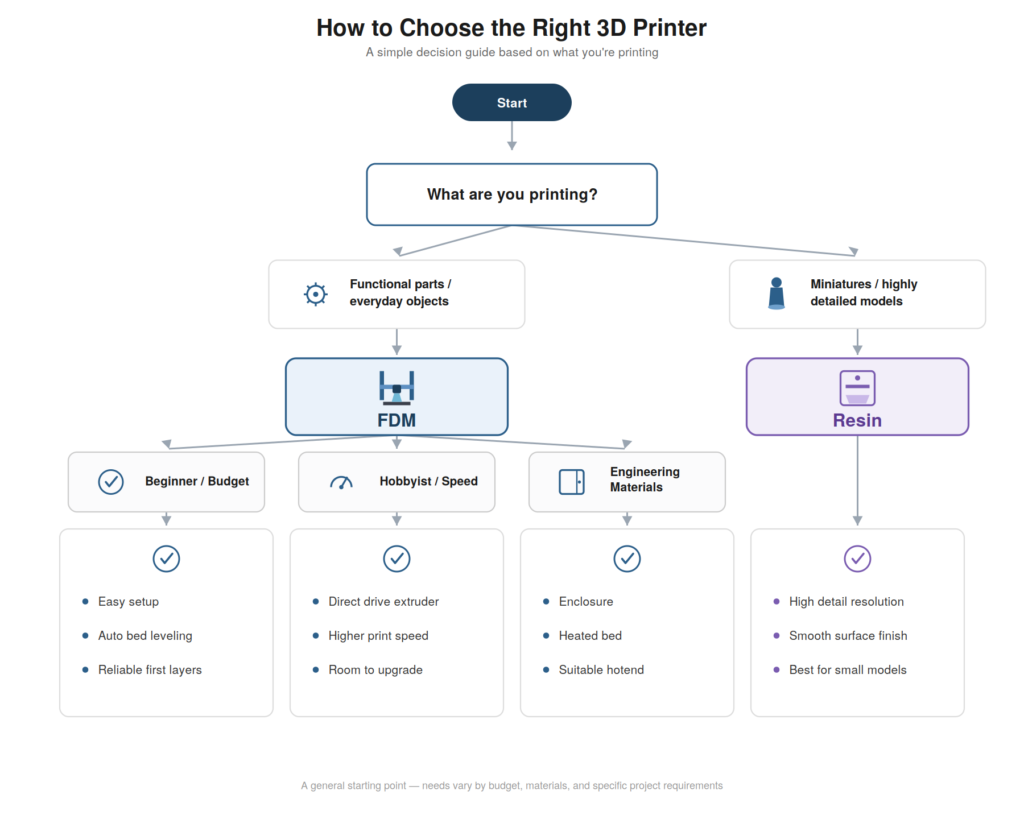
Here’s the honest starting point: there is no single best 3d printer for everyone, and any article that claims otherwise is oversimplifying. The best 3d printer is the one that matches how you actually plan to print. What makes a printer the right choice depends on a handful of factors that pull in different directions.
Budget is the obvious one, but it’s not just about sticker price — a cheap printer with expensive, hard-to-find spare parts can cost more over time than a slightly pricier one with better support. Print quality and speed often trade off against each other; a printer tuned for maximum speed sometimes sacrifices the fine detail a slower, more deliberate machine can achieve. Reliability matters more than most beginners expect — a printer that fails constantly isn’t actually saving you money just because it was cheap.
Ease of use, build volume, material compatibility, how much maintenance a machine demands, whether it can be upgraded later, and how active its community and parts ecosystem is all factor into whether a given printer is actually a good fit. Together, these factors help determine whether a particular machine is the best 3d printer for you. What’s best for a hobbyist chasing print speed looks nothing like what’s best for a student who just wants reliable, uncomplicated prints for a school project.
Best 3D Printer for Beginners
If you’re buying your first machine, the features that matter aren’t the ones in flashy spec comparisons — they’re the ones that reduce troubleshooting in your first month. That approach is far more useful than simply searching for the best 3d printer by price or popularity.
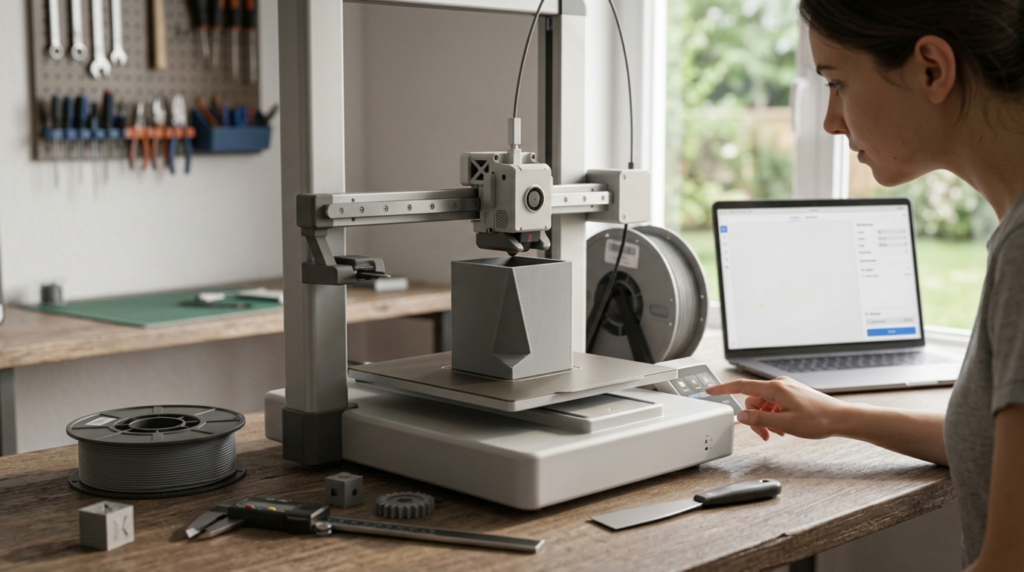
Easy setup matters more than people expect. A printer requiring extensive assembly and calibration knowledge before producing a good print is a rough start. Automatic bed leveling helps enormously, since manual leveling is one of the more finicky beginner skills — though it compensates for an uneven bed, it doesn’t fix every first-layer problem on its own. (If you’ve already run into first-layer trouble on a leveled bed, it’s usually a Z-offset, temperature, or cleanliness issue rather than the leveling itself — worth checking each individually before assuming the printer’s at fault.)
Reliable first layers generally come from a printer with decent build quality out of the box rather than one needing significant tuning. A simple, well-documented slicer workflow reduces the learning curve, since fighting confusing software on top of learning the physical process is a lot at once. Good documentation and an active community matter too — when something goes wrong, finding an answer quickly makes the difference between a quick fix and a frustrating week.
Replacement part availability, basic safety features like a stable frame, and maintenance that doesn’t require specialized tools round out what makes a printer beginner-friendly. The best 3d printer for beginners generally isn’t the cheapest or most feature-packed option — it’s the one that gets you printing successfully without a steep learning curve. In other words, the best 3d printer is often the machine that creates fewer problems while you’re still learning. Of the models listed above, the Kobra 2 Neo and Ender 3 V3 SE are both built specifically around that idea, with auto-leveling doing most of the early heavy lifting.
Best Budget 3D Printer
Budget shopping is where a lot of buyers get steered wrong, mostly because purchase price is the easiest number to compare and the least complete picture of actual cost. The best 3d printer at a lower price isn’t necessarily the cheapest machine available.
A good budget FDM printer balances low upfront cost against build quality that won’t fail constantly. For many buyers, the best 3d printer in this category is the one that delivers reliable prints without creating expensive maintenance problems. The cheapest option on a marketplace listing isn’t automatically the best affordable 3d printer — sometimes it’s just the cheapest. Hidden costs matter: replacement nozzles, belts, and build surfaces add up, and a machine using unusual or proprietary parts can end up costing more in upkeep than a similarly-priced printer using common components.
Filament costs are worth factoring in too, though mostly independent of which printer you buy — still, a printer that wastes filament through frequent failed prints raises your real cost per successful object. When people search for the best 3d printer on a budget or the best low cost 3d printer, what they’re often actually looking for is the best value: something cheap to buy that doesn’t become expensive to keep running. Build quality and reliability at a given price point matter more than raw specs on paper, since a slightly slower, more consistent printer usually beats a faster one that jams or fails unpredictably.
Best 3D Printer Under ₹20,000
For Indian buyers specifically, the sub-₹20,000 range is where a lot of first purchases happen, and it’s worth understanding what’s realistic at that price point rather than expecting features from higher budgets.
At this range, you’re generally looking at simpler FDM machines — smaller build volumes, possibly manual or basic automatic leveling, fewer premium conveniences like touchscreens or advanced connectivity. That’s not necessarily bad; plenty of capable printers exist here, and the best 3d printer under 20000 for a given buyer is usually one that does the fundamentals — consistent first layers, decent build quality, community support — well rather than competing on features it can’t really deliver at that price.
The Anycubic Kobra 2 Neo in the comparison above is a reasonable example of what this tier looks like in practice: auto-leveling and a functional direct drive setup, without pretending to be a premium machine. For buyers in this range, the best 3d printer is usually the one that gets the basics right rather than chasing premium features.
Prices in this market shift often based on currency fluctuation, seller promotions, and import costs, so any specific number here — including the ones in the table above — should be treated as a general reference. Always check current listings before assuming a price is accurate. What’s worth prioritizing at this budget is an active community, reasonably available spare parts, and honest reviews from other buyers in the same price bracket rather than marketing copy alone.
Best 3D Printer in India
Buying in India comes with its own specific considerations beyond just picking a good machine. These local factors can make a major difference when deciding which best 3d printer is actually worth buying.
Availability is the first thing to check — a printer that looks great in an international review but has limited stock or long shipping times locally can turn into a frustrating purchase regardless of how good the machine is. For Indian buyers, the best 3d printer is also one that can be supported locally. Spare parts availability matters just as much; a printer using components easy to find from Indian sellers saves real headaches compared to one where a broken part means weeks of waiting.
Warranty terms and after-sales support vary a lot by seller and brand, so it’s worth reading the actual terms rather than assuming standard coverage. Filament availability locally affects your ongoing costs and convenience. Electricity considerations, like voltage compatibility, matter too, particularly for printers originally designed for different regional power standards.
Online purchasing is the norm for most 3D printer buyers in India, which makes seller reputation, return policies, and shipping practices worth checking carefully before ordering. Community support specifically for the Indian market — local forums, group chats, sellers who understand regional issues — can be a real asset when something goes wrong. When people ask what the best 3d printer in india actually is, the honest answer depends heavily on which specific model has decent local support at the time you’re buying , not just which one performs best in a lab test somewhere else.
Best 3D Printer Price in India
Pricing in India spans a wide range, and it helps to think in categories rather than fixating on one number, since the best 3d printer price in india for your situation depends entirely on what tier of machine actually fits your needs.
Entry-level machines sit at the lowest price point, generally offering smaller build volumes and more basic feature sets — reasonable for students or absolute beginners testing the waters. Budget-tier printers step up slightly, often adding automatic bed leveling or somewhat larger build volumes while staying accessible. Mid-range machines bring more reliability, better build quality, and sometimes faster speeds, aimed at hobbyists who’ve outgrown entry-level limitations.
Advanced or enthusiast-tier printers cost considerably more but offer speed, precision, or build volume that actually matters for more serious use. Resin printers occupy their own separate pricing tier, generally more affordable than expected for entry-level models but requiring additional spending on post-processing equipment.
Any specific figures — including those in the comparison table earlier in this guide — should be treated as rough, time-sensitive references. Prices shift with currency movement, promotions, and general market changes, so checking current listings before deciding is always the safer move.
FDM vs Resin: Which Is Better?
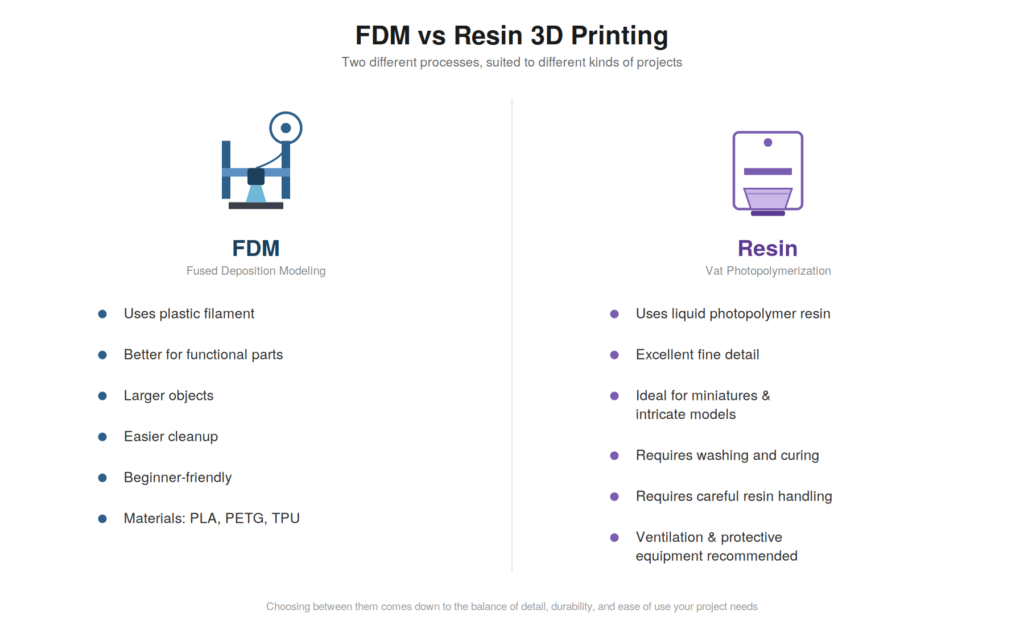
This is one of the most common points of confusion for new buyers, and the honest answer is that neither technology is universally better — they’re suited to genuinely different projects. Understanding this difference is essential when deciding which best 3d printer matches your intended use.
FDM 3D Printers
FDM printers melt and extrude plastic filament, building objects layer by layer. They’re generally the more practical starting point for most people, since filament is easier to handle than liquid resin, cleanup is minimal, and the printers tend to be more forgiving of beginner mistakes.
FDM handles larger models comfortably and produces genuinely functional parts — brackets, enclosures, tool holders — that need to survive real handling rather than just look good. For most home use, hobbyist projects, and general-purpose printing, FDM remains the more common and approachable choice. For a deeper look at which filament suits which project, see our full filament types and uses guide, which goes into PLA, PETG, ABS, and the rest in more detail than fits here.
Resin 3D Printers
Resin printers use light to cure liquid resin layer by layer, and the payoff is significantly finer detail than FDM can typically achieve at a comparable price. This makes resin the natural choice for miniatures, figurines, and small, intricate models where surface detail matters. The trade-off is real: resin handling requires more care, since uncured resin is a chemical you don’t want on your skin or eyes, and finished prints need washing and curing before they’re usable. Proper ventilation matters more here than with FDM, and additional equipment — wash stations, curing setups, gloves — adds both cost and complexity.
If you’re specifically hunting for the best resin 3d printer, remember that the best 3d printer depends on whether you’re prioritizing fine detail for small models or the general-purpose flexibility of FDM, and whether you’re prepared for the extra post-processing resin genuinely requires. The Elegoo Mars 5 Ultra in the comparison table is one example of what an entry-to-mid-tier resin machine looks like on Amazon India.
What Is the Best 3D Printer in the World?
People search this question a lot, and it’s worth addressing directly: there isn’t a single best 3d printer in the world, because the right choice depends on the specific use case.
What works for a total beginner looks nothing like what works for a speed-focused hobbyist, which looks nothing like the right pick for detailed miniature work, which looks nothing like what a professional prototyping shop would choose for large-format functional parts. Rather than one universal winner, it makes more sense to think in categories when deciding which best 3d printer fits your needs: beginners are best served by reliability and ease of use over raw capability.
Budget buyers do best balancing low cost against genuine build quality. Speed-focused buyers need to already understand tuning well enough to push a machine without constant failures. Detailed model work generally means a resin printer rather than FDM. Large prints mean prioritizing build volume over fine detail. And the best value pick, broadly, is whichever printer does the fundamentals reliably without overcharging for features a specific buyer doesn’t need.
What Should You Look for in a 3D Printer?
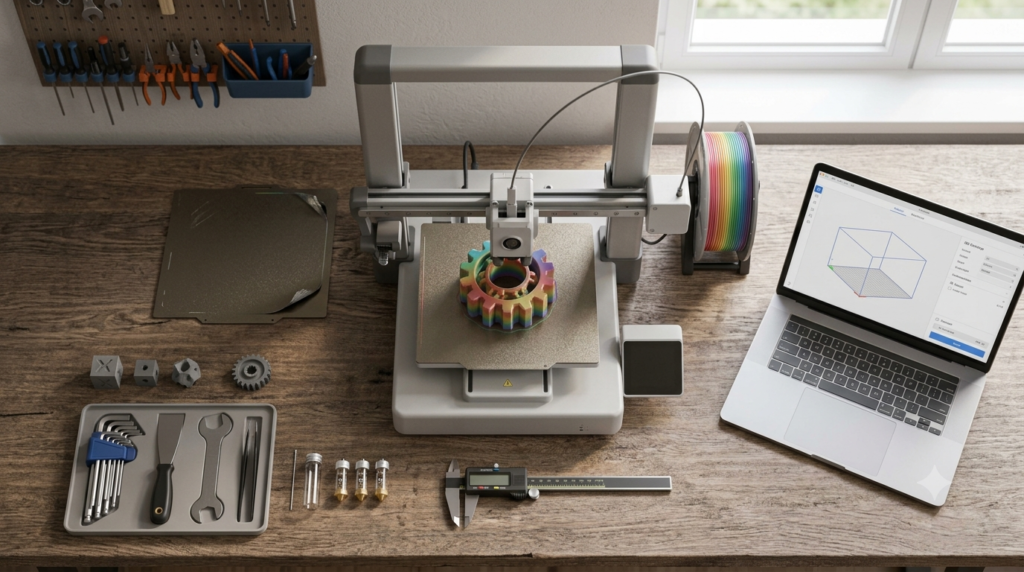
A handful of concrete features are worth understanding before comparing specific models. Knowing these specifications makes it much easier to identify the best 3d printer for your particular projects.
Build Volume
How large an object the printer can produce in one piece. Larger isn’t automatically better — a bigger build volume usually means a bigger, pricier machine — but it’s worth matching to what you actually intend to print.
Print Quality
Layer height, nozzle size, and dimensional consistency all affect how a finished print looks and measures. A smaller layer height produces smoother surfaces at the cost of longer print times.
Print Speed
Advertised maximum speed and practical, everyday speed are often two very different numbers. A printer marketed around a high top speed may only hit that figure under ideal conditions, while reliable printing happens at a meaningfully slower pace. High advertised speed figures are best treated as maximum capabilities, not settings you’ll necessarily use for every print. Real-world speeds depend on the printer, material, model, and print settings.
Automatic Bed Leveling
This compensates for an uneven bed surface by adjusting nozzle height automatically. It’s a real time-saver, but doesn’t fix every first-layer problem — a dirty nozzle, wrong temperature, or poor filament can still cause issues on a perfectly leveled bed.
Direct Drive vs Bowden
Direct drive extruders sit right above the hotend, giving more precise control, particularly for flexible filaments like TPU. Bowden setups place the motor elsewhere on the frame, meaning a lighter, faster-moving print head but slightly less precise control over flexible materials.
Filament Compatibility
Not every printer handles every material equally well. Basic machines handle PLA reliably; PETG, TPU, and more demanding materials like ABS, ASA, or nylon may need better temperature control or an enclosure to print consistently.
Heated Bed
Improves adhesion for most materials and is close to essential beyond basic PLA, since materials like ABS and PETG benefit significantly from a warm surface.
Enclosure
Helps maintain stable ambient temperature, which matters a lot for materials prone to warping, like ABS. Less necessary for PLA, more useful once you work with temperature-sensitive filaments.
Nozzle Options
Standard brass nozzles handle most common filaments fine. Abrasive materials — carbon fiber blends, glow-in-the-dark, some metal-filled options — wear brass quickly and benefit from a hardened steel nozzle.
Maintenance
Belts need occasional tension checks, nozzles wear over time, build plates need cleaning, and some components benefit from periodic lubrication depending on the printer’s design.
Software / Slicer
The slicer converts a 3D model into instructions the printer follows, and compatibility with your printer, along with profile quality, meaningfully affects how easy it is to get good results.
Spare Parts
Availability matters everywhere, but especially in India, where shipping times and import costs for obscure parts can turn a small repair into a long wait. Common, widely available components make for an easier long-term ownership experience — it’s part of why all five printers in the comparison table above are sold through established Amazon India listings rather than obscure importers.
Which Printer Is Right for You?
Matching a printer to your specific situation is really the core of this decision. This is what ultimately determines the best 3d printer for your needs.
For beginners, prioritize ease of use, reliable first layers, and strong community support over raw features. For students, a straightforward, budget-conscious FDM machine that handles basic projects reliably is usually the practical choice.
For home use, reliability and reasonable noise levels tend to matter more than maximum speed or build volume. For hobbyists, a printer with room to grow — upgradeable components, active community, broader material compatibility — pays off as your skills develop.
For makers working on varied projects, versatility matters more than specializing in one narrow use case. For functional parts, dimensional accuracy and compatibility with tougher materials like PETG or nylon matter more than raw speed. For miniatures, resin printing generally serves the goal better than FDM, given the fine detail resin can achieve. For large prints, build volume becomes the deciding factor.
For fast printing, look toward machines specifically tuned for speed, understanding this sometimes trades off against ease of use for a beginner.
For budget buyers, focus on value and reliability at your specific price point rather than chasing the cheapest listing. For Indian buyers, local support and spare parts availability matter as much as raw specifications. What’s right for you, in other words, is defined by your actual situation far more than by any general ranking. The best 3d printer is ultimately the one that fits your projects, budget, and experience level. — which is exactly why the comparison table earlier groups picks by use case instead of by a single “winner.”
Printer Categories Compared
| Category | Best For | Important Features | Main Trade-Off |
|---|---|---|---|
| Entry-Level FDM | Beginners, students | Simple setup, easy maintenance | Lower speed and fewer features |
| Budget FDM | Hobbyists on a budget | Good value, reasonable build area | More manual tuning required |
| Fast FDM | Experienced users | High-speed printing capability | Higher cost, steeper learning curve |
| Resin | Miniatures, detailed models | Fine surface detail | More post-processing required |
| Enclosed FDM | Engineering materials | Controlled printing environment | Higher price point |
The Real Cost of Owning a 3D Printer
The printer itself is only part of what you’ll actually spend, and it’s worth planning for the rest before committing.
Filament or resin is an ongoing cost that scales with how much you print. Build plates wear out eventually and need replacing. Nozzles wear down over time, especially with abrasive materials, and having spares avoids a project grinding to a halt. Basic tools for removing supports and general maintenance add a modest but real cost. Cleaning supplies, particularly for resin printing where isopropyl alcohol and proper disposal matter, are an ongoing expense too.
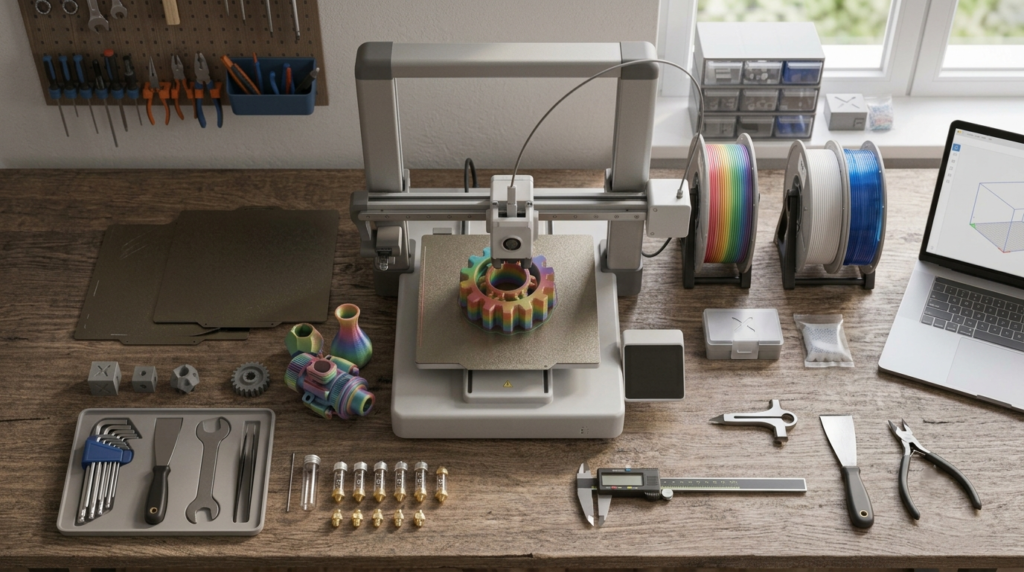
Storage for filament, ideally somewhere dry, and ventilation for resin work both matter for long-term quality and safety. Resin specifically requires curing equipment if it doesn’t come bundled with the printer. Electricity costs are generally modest but not zero. And ongoing maintenance — replacement belts, occasional part wear — is worth budgeting for as a small but real recurring cost rather than treating the printer as a one-time purchase.
Which Filament Should You Use?
Material choice affects both what you can print and how easy the printer is to run day to day.
PLA is the easiest material to print reliably, doesn’t need a heated enclosure, and holds detail well, making it the natural default for beginners and decorative prints. Its main limitation is brittleness and relatively low heat resistance.
PETG offers noticeably more durability and moisture resistance than PLA, making it solid for functional parts, though it can string more easily and needs slightly more careful tuning.
TPU is a flexible filament suited to grips, phone cases, and bendable parts. It prints slower than rigid filaments and benefits from a direct-drive extruder, but opens up projects rigid materials can’t handle.
ABS and ASA offer better heat resistance and durability but are prone to warping without an enclosure and benefit from good ventilation. ASA specifically handles outdoor UV exposure better than ABS.
Nylon is a strong, abrasion-resistant engineering material, but it’s dramatically more moisture-sensitive than the others and generally isn’t beginner-friendly.
No single filament is universally the best choice — it depends on what you’re actually making and how much printing experience you’re bringing to the material. If you want the fuller picture, including a side-by-side comparison chart and specialty filaments like carbon fiber and wood-filled blends, that’s covered in our dedicated 3D printer filament types guide.
Common Mistakes When Buying a 3D Printer
A few recurring mistakes trip up a lot of first-time buyers, worth naming plainly. Avoiding these mistakes makes it easier to choose the best 3d printer without paying for features you don’t actually need.
Buying based on price alone, without considering build quality or parts availability, often costs more in the long run. Focusing purely on maximum advertised speed ignores that practical, everyday speed usually sits well below the marketed number. Ignoring spare parts availability seems unimportant until something breaks and you’re waiting weeks for a replacement. Ignoring build volume — buying too small or too large — is an easy mistake to avoid with a bit of planning.
Choosing resin without understanding the post-processing involved leads to frustration once washing, curing, and ventilation requirements become clear. Buying a printer more complicated than your current skill level creates unnecessary early frustration. Ignoring filament compatibility means discovering later that your printer can’t handle a project’s material. Ignoring community support matters more than expected, since troubleshooting help from other owners is genuinely valuable when something goes wrong.
Assuming automatic leveling solves every printing problem overlooks the many other factors — temperature, filament quality, nozzle condition — that also affect results. Ignoring maintenance requirements leads to a printer that degrades faster than it should. And buying based purely on YouTube hype, without checking whether a specific model fits your actual budget and needs, is one of the most common ways people end up disappointed with an otherwise decent machine.
How to Keep a 3D Printer Running Well
Basic maintenance habits keep a printer reliable for much longer than neglect ever does. Regular cleaning — wiping the build plate, keeping the frame free of dust — prevents small issues from becoming bigger ones. Bed care, including proper cleaning between prints and periodic inspection for warping, keeps first layers consistent.
Nozzle inspection catches wear before it causes under-extrusion or poor quality. Belt tension should be checked periodically, since a loose belt causes layer shifting. Frame checks — looking for loose screws or joints — catch mechanical problems before they cause a failed print. Proper filament storage away from humidity prevents moisture-related issues down the line.
Lubrication of moving parts, where the printer’s design calls for it, keeps mechanisms moving smoothly, though it’s worth following manufacturer guidance rather than guessing. Firmware updates, when actually needed, can resolve known issues. Regular calibration — checking Z-offset, bed level, extrusion consistency — catches drift before it causes failures.
And paying attention to unusual noises rather than ignoring them catches mechanical problems while they’re still small, cheap fixes rather than bigger repairs. If a print keeps failing at the first layer specifically even after you’ve gone through all of this, it’s worth working through the possible causes one at a time rather than guessing — our first-layer troubleshooting guide breaks that process down step by step.
Buying a 3D Printer in India: What to Check
Beyond picking the right machine, a few practical checks matter specifically for buyers in India.
Seller reputation is worth researching before ordering, particularly for less established brands or resellers. Warranty terms vary significantly and are worth reading in full rather than assuming standard coverage applies. Replacement parts availability, ideally from local sellers, saves real time and money if something needs fixing. Local support — a responsive seller, an active community, or accessible documentation — matters more than expected until you actually need it.
Return policies should be understood before purchase, since 3D printers can have setup issues that only become apparent after unboxing. Shipping practices and expected delivery timelines are worth checking directly with the seller. Proper invoicing matters for warranty claims and any potential returns. Checking what accessories are actually included versus what needs separate purchase avoids unexpected costs. Voltage compatibility is worth confirming for any printer not specifically designed for the Indian market. And general service availability — whether a seller offers meaningful support after the sale — is worth asking about directly.
Useful 3D Printing Accessories Worth Considering
Beyond the printer itself, a handful of accessories meaningfully improve the ownership experience. Reliable PLA and PETG filament cover most everyday needs, while TPU is worth having on hand for flexible parts. Spare nozzles, including a hardened steel option for abrasive filaments, prevent a worn nozzle from halting a project. Digital calipers help verify dimensional accuracy on functional prints.
Deburring tools and basic cleanup supplies make post-processing meaningfully easier. A spare build plate prevents downtime if the original gets damaged. Filament dryers and proper storage containers matter more than expected, particularly for moisture-sensitive materials. For anyone considering resin, washing and curing equipment is close to essential rather than optional.
Safety Considerations
3D printing is generally low-risk when handled sensibly, but it’s worth being aware of a few real considerations. Heated components — the nozzle and heated bed — reach temperatures that can burn on contact, so care is warranted, especially around children. Moving parts, while generally not dangerous at normal speeds, are worth keeping fingers away from during operation.
Resin handling needs particular care, since uncured resin can irritate skin and eyes, and gloves are worth using during handling and cleanup. Proper ventilation matters for resin fumes and, to a lesser degree, FDM printing, particularly with materials like ABS that release more noticeable odor. Children should be supervised around an active printer given the heat and moving parts involved.
Basic electrical safety — using a proper outlet, avoiding damaged cords — applies the same way it would to any household appliance. Sharp tools used for post-processing deserve the same caution as any small blade. And proper storage of both filament and resin, away from children and pets, is a reasonable precaution.
You Might Also Like
- 3D Printing Innovations: What’s Actually Changing and Why It Matters
- How to Calibrate a 3D Printer: A Practical, No-Nonsense Guide
- 3D Printing Problems: Proven Fixes That Actually Work
- Things to 3D Print: A Practical Guide to Useful, Fun, and Worthwhile Projects
- Creality Ender 3 V3: A Practical Look at Features, Specs, and Whether It’s Right for You
- 31 Best 3D Printed Fidget Toys & Fun Toys to Make
- 111 Best 3D Printed Animals to Make: Easy, Articulated & Fun Ideas
- 3D Printer Filament Types Guide
Frequently Asked Questions
What is the best 3D printer for beginners?
The best 3d printer for beginners is generally one with reliable automatic bed leveling, a simple slicer workflow, good documentation, and active community support — not necessarily the cheapest or most feature-packed option. The Anycubic Kobra 2 Neo and Creality Ender 3 V3 SE, both listed on Amazon India, are reasonable examples of what to look for (check the current listing for up-to-date availability and pricing).
What is the best budget 3D printer?
The best budget 3d printer balances low purchase price against genuine build quality and parts availability, since the cheapest option isn’t always the best affordable 3d printer once hidden costs are factored in.
What is the best 3D printer under ₹20,000?
At this price point, look for a machine that handles the fundamentals well — consistent first layers, decent build quality, active community support — rather than expecting premium features common at higher budgets. The Anycubic Kobra 2 Neo was priced within this range on Amazon India at the time of writing, though it’s worth checking the current listing before assuming that still holds.
Which is the best 3D printer in India?
This depends heavily on current local availability, spare parts access, and after-sales support at the time of purchase, more than any single universal recommendation.
What is the best resin 3D printer?
The best resin 3d printer for a given buyer depends on balancing detail requirements against comfort with post-processing steps like washing, curing, and proper ventilation. The Elegoo Mars 5 Ultra, listed on Amazon India, is one reasonable entry point for detail work worth researching further.
How much does a good 3D printer cost in India?
Pricing spans a wide range from entry-level to advanced machines, and current figures shift with currency and market conditions, so checking live listings — like the ones in the comparison table above — is more reliable than any fixed number.
Is FDM or resin better for beginners?
FDM is generally more beginner-friendly overall, since it involves less handling complexity and cleanup, though resin can suit beginners specifically interested in detailed miniatures who are prepared for the extra post-processing.
Is an expensive 3D printer worth it?
Sometimes — higher-priced machines often offer better reliability, speed, or precision, but only if those specific advantages actually matter for what you plan to print.
What should I check before buying a 3D printer?
Build volume, material compatibility, spare parts availability, community support, and realistic total cost of ownership all matter more than headline specs alone.
What is the best 3D printer in the world?
There isn’t one — it depends entirely on the specific use case, whether that’s beginner reliability, budget value, print speed, fine detail, or large-format capability.
Conclusion
There’s no single best 3d printer waiting to be crowned — the best 3d printer is the one that fits your specific budget, skill level, and the kinds of things you actually want to make. Beginners generally do best prioritizing reliability and ease of use over raw specifications, since a frustrating first experience is more likely to end a new hobby than a slightly slower print speed ever will. Indian buyers specifically benefit from paying close attention to spare parts availability and after-sales support, since those factors affect the ownership experience more than most spec sheets let on.
FDM and resin serve genuinely different purposes rather than competing on the same axis, and understanding which one matches your actual projects matters more than picking whichever technology seems more impressive. The cheapest option on the market isn’t automatically the best value, and the most expensive one isn’t automatically the best choice either — both extremes miss the more useful question, which is simply what you’ll actually use and how reliably it’ll perform for the kind of printing you have in mind.
Getting that match right matters more than any single feature on a spec sheet, and the comparison table near the top of this guide is as good a place as any to start narrowing things down when choosing the best 3d printer.