

 By
By Most beginners spend hours comparing printers — build volume, motion system, screen size — and almost no time thinking about the small metal tip actually pushing melted plastic onto the build plate. That’s the 3D printer nozzle, and it’s easy to overlook precisely because it’s so small. But this tiny component has an outsized effect on surface detail, print speed, and which materials your printer can actually handle.
At first, a 3D printer nozzle looks almost insignificant — a few grams of metal with a tiny hole drilled through it. The interesting part is how much that hole’s exact diameter, and the metal it’s made from, changes the entire printing experience. Most printers ship with a 0.4mm nozzle, and there’s a good reason that size became the default. But it’s not the only option, and understanding when a different 3D printer nozzle actually makes sense — smaller for fine detail, larger for speed, harder metal for abrasive filament — is genuinely useful knowledge.
This guide walks through what a 3D printer nozzle actually does, how nozzle size and material affect real prints, when the standard 3D printer nozzle 0.4mm option is right and when it isn’t, plus the compatibility, maintenance, and troubleshooting basics that keep a printer running well.
What Is a 3D Printer Nozzle?
A 3D printer nozzle is the small metal component at the tip of the hotend that filament passes through right before it’s deposited onto the print. Solid filament feeds into the hotend, gets heated to a molten state, and is pushed out through the nozzle’s narrow opening, shaping the extruded plastic into a controlled, consistent line.
The nozzle threads into the bottom of the hotend assembly, typically connecting to a heat break that separates the hot zone from the cooler upper section. That opening — the nozzle diameter — directly controls how wide each extruded line is, which affects nearly everything about how a print looks and how quickly it finishes.
Nozzle condition matters just as much as size. A worn, damaged, or partially clogged 3D printer nozzle changes flow character in ways that show up as rough surfaces, inconsistent extrusion, or dimensional inaccuracy, even if every other setting is correct.
Why Does a 3D Printer Nozzle Matter So Much?
It’s worth spending a moment on why this specific component has such an outsized effect on print quality.
Print detail depends heavily on nozzle diameter — a smaller opening allows finer, more precise lines. Printing speed is tied to the nozzle too, since a wider opening pushes out more material per pass. Extrusion consistency and overall surface finish depend on the nozzle being clean, correctly sized, and free of wear.
Material compatibility is another piece of this. Some filaments — carbon fiber blends, glass-filled materials — are abrasive enough to wear down a standard nozzle quickly, which is why nozzle material becomes relevant alongside size. Reliability and maintenance needs trace back to the nozzle too; a worn or poorly chosen 3D printer nozzle leads to more frequent clogs and more troubleshooting. Put simply, a 3D printer nozzle isn’t a minor accessory — it’s one of the few components that touches nearly every dimension of a finished print.
3D Printer Nozzle Sizes Explained
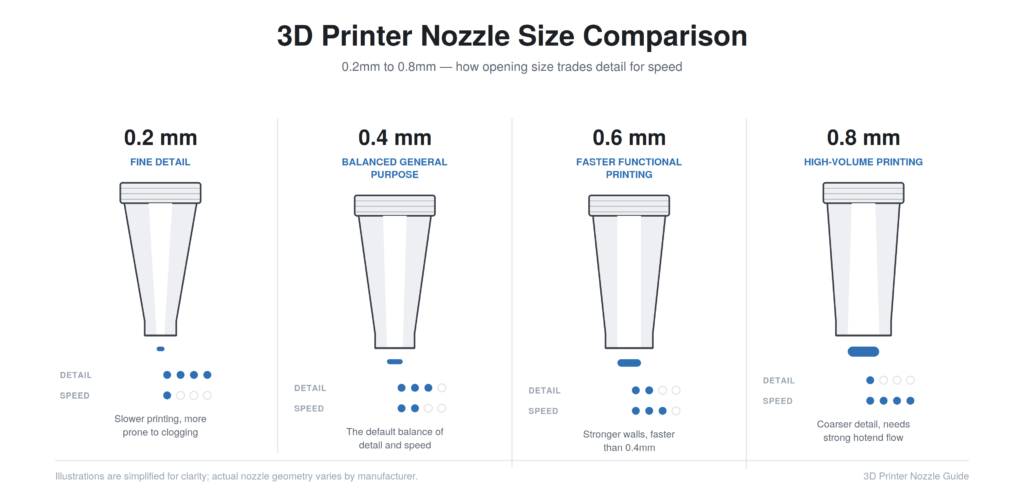
Nozzle diameter is probably the single most consequential spec to understand when comparing 3D printer nozzles, since it shapes the fundamental trade-off between detail and speed.
0.2mm Nozzle
A 0.2mm nozzle produces very fine, precise lines, making it a reasonable choice for miniatures, small text, and models with intricate surface detail. Printing is noticeably slower, and the small opening is more prone to clogging, particularly with filament that isn’t perfectly consistent in diameter. This size suits detail-focused projects where print time isn’t the priority, but it’s a poor default for everyday printing.
0.4mm Nozzle
This is where most people start, and for good reason. A 3D printer nozzle 0.4mm in diameter strikes a workable balance between fine enough detail and fast enough printing, which is exactly why it became the default on the vast majority of consumer printers.
Beginners benefit from a 3D printer nozzle 0.4mm setup because nearly every slicer profile and tutorial assumes this size by default, removing a layer of complexity while you’re still learning. It handles PLA comfortably, prints PETG reasonably well, and covers general-purpose printing — organizers, desk accessories, simple mechanical parts — without demanding much thought about whether the nozzle itself is the right choice.
Typical layer heights paired with a 0.4mm nozzle sit in a moderate range balancing detail against reasonable print time, though the ideal setting always depends on the specific model and your printer’s calibration. The main limitation is that it’s a compromise by design — not the fastest option, and not the most detailed either.
0.6mm Nozzle
A 0.6mm nozzle trades some fine detail for noticeably faster printing and stronger walls, since each extruded line is wider and each layer bonds with more surface contact. This size suits functional parts where strength and speed matter more than surface finish. Detail suffers somewhat compared to a 0.4mm nozzle, but for a lot of practical printing, that trade-off is worth it.
0.8mm Nozzle
At the larger end, a 0.8mm nozzle is built for speed on bigger objects — thick-walled functional parts, large-scale models, anything where minimizing print time matters more than fine surface detail. The extrusion width is considerably larger, meaning thicker walls with fewer perimeters and genuinely fast layer coverage. The trade-off is a clear loss of fine detail, and this size also demands more from the hotend, since it needs to melt and push out considerably more material per second. Larger isn’t automatically better — it’s a specialized choice, not an upgrade path everyone should follow.
3D Printer Nozzle Size Comparison
| Nozzle Size | Best For | Main Advantage | Main Drawback |
|---|---|---|---|
| 0.2mm | Miniatures, fine detail, small text | Very high detail | Slow, prone to clogging |
| 0.4mm | General-purpose printing, beginners | Balanced detail and speed | Not the fastest or most detailed |
| 0.6mm | Functional parts, faster prints | Stronger walls, faster than 0.4mm | Noticeably less fine detail |
| 0.8mm | Large objects, thick-walled parts | Very fast on big prints | Coarse detail, needs strong hotend flow |
The pattern across this table is straightforward: as nozzle diameter increases, print speed and wall strength generally go up while fine detail goes down. There’s no universally correct choice here — the right 3D printer nozzle size depends entirely on what you’re actually printing and which trade-off matters more for that specific project.
3D Printer Nozzle 0.4mm: Is It Still the Best All-Round Size?
Given everything else available, it’s worth asking directly whether the 3D printer nozzle 0.4mm standard still deserves its default status, and for most general use, the answer is yes.
Its biggest strength isn’t really about detail or speed in isolation — it’s compatibility. Slicer software ships with 0.4mm as the default assumption, community troubleshooting advice is written with this size in mind, and replacement nozzles in this diameter are the easiest to find. For PLA, it prints cleanly and reliably. For PETG, it handles the material’s slightly stickier behavior fine with reasonable settings.
Even TPU works acceptably through a standard 0.4mm opening once retraction and speed are tuned. For general household prints, it simply covers the need without requiring a size-specific decision.
Where 0.4mm stops being ideal: genuinely detailed miniature work benefits from something smaller, large functional prints benefit from something bigger. But as a starting point, and for the majority of everyday printing, it remains the sensible choice rather than something beginners should feel pressure to immediately upgrade away from.
3D Printer Nozzle Materials Explained
Size isn’t the only variable — the metal a nozzle is made from changes durability and, in some cases, print behavior.
Brass Nozzles
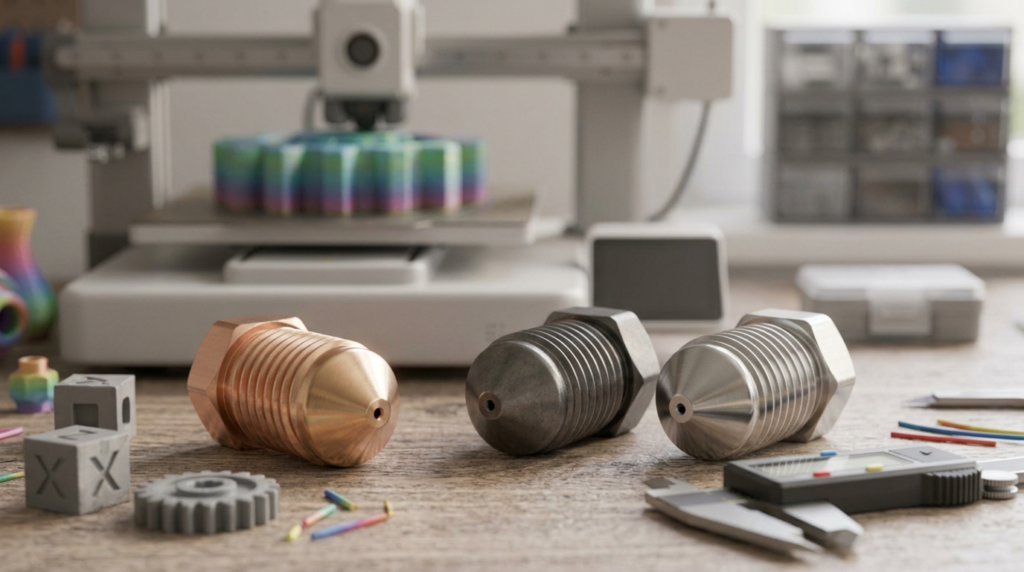
Brass is the default material on most printers, and it’s a genuinely solid general-purpose choice. It offers good thermal conductivity, is relatively inexpensive, and handles common materials like PLA and PETG without issue. Its main limitation is wear resistance — abrasive filaments will wear down a brass nozzle’s opening faster than gentler materials, gradually widening the hole and affecting extrusion consistency.
Hardened Steel Nozzles
Hardened steel nozzles exist specifically to handle abrasive materials — carbon-fiber-filled filament, glow-in-the-dark filament, and glass-filled blends. These particles chew through brass relatively quickly, while hardened steel resists that wear far better. The trade-off is generally somewhat lower thermal conductivity compared to brass, though for most practical purposes this is manageable rather than a serious limitation.
Stainless Steel Nozzles
Stainless steel nozzles serve more specialized use cases, valued for durability and certain material compatibility scenarios. One thing worth being clear about: don’t assume a stainless steel nozzle is automatically food-safe just because the material sounds like something from a kitchen — food contact safety depends on far more than the nozzle alone.
No single nozzle material is universally best. Brass suits the vast majority of standard printing. Hardened steel earns its keep specifically with abrasive filaments.
Best 3D Printer Nozzle for Different Materials
PLA prints comfortably through a standard brass 3D printer nozzle without any special requirements. PETG also typically works fine with brass, though it can be slightly more prone to oozing, which is more a matter of temperature and retraction tuning than nozzle material. TPU generally doesn’t require a special nozzle material, though a direct-drive extruder setup often matters more for successful TPU printing than the nozzle itself.
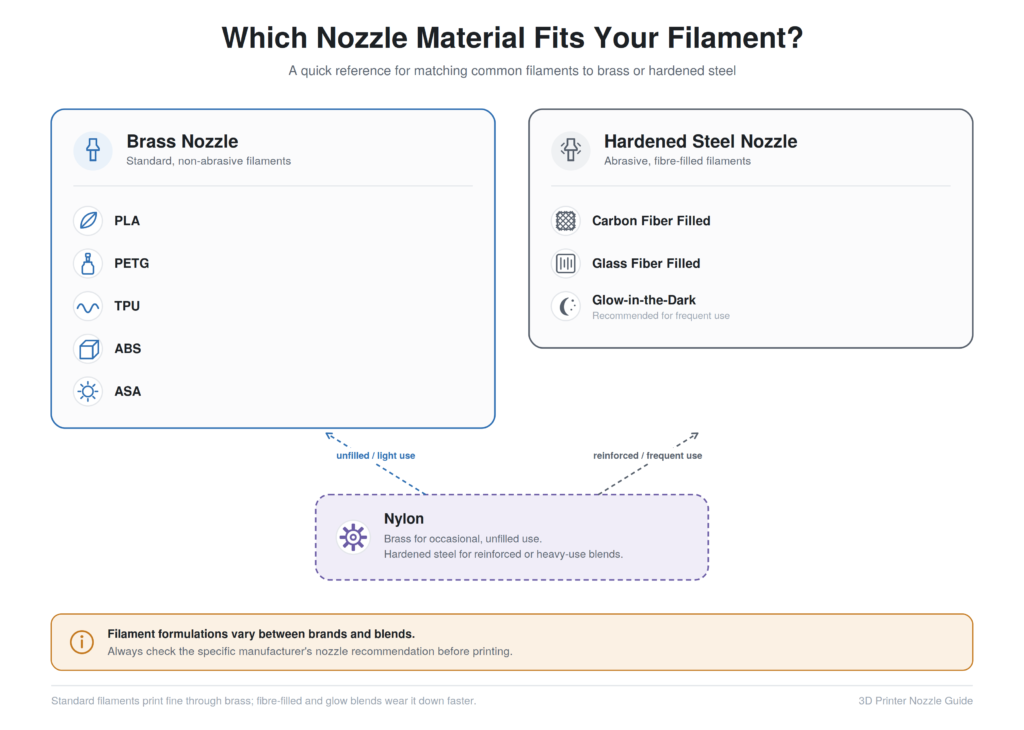
ABS and ASA print acceptably through brass in most cases, with the bigger challenges around these materials typically relating to enclosure and ventilation rather than nozzle wear. Nylon can be printed through brass for occasional use, though it’s worth checking your filament manufacturer’s guidance, since some blends include reinforcing additives that behave more abrasively than plain nylon.
Carbon fiber filled filament is one of the clearest cases where a hardened nozzle for carbon fiber becomes genuinely important — the embedded fibers wear down brass noticeably faster. Glow-in-the-dark filament often contains similarly abrasive phosphorescent particles, so a hardened nozzle is worth considering here too, particularly for frequent use.
3D Printer Nozzle Size vs. Print Quality
The relationship between nozzle diameter and print quality isn’t simply “smaller is better.” A smaller nozzle produces finer extrusion lines, allowing more precise detail, but it also means more total lines needed to fill the same area, which slows things down and introduces more opportunities for minor inconsistency across a long print.
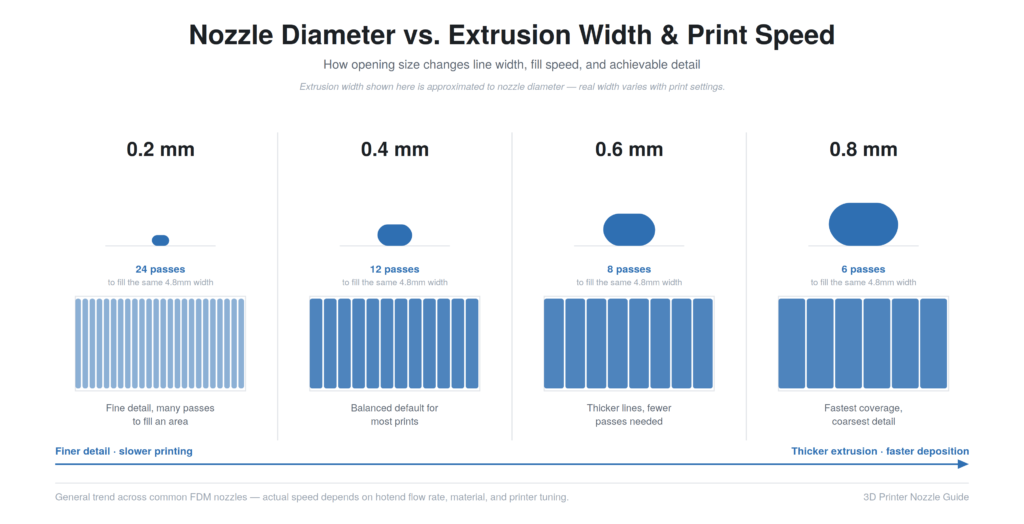
Layer height is closely tied to nozzle diameter — most nozzles handle a reasonable range of layer heights, but going drastically outside that range tends to hurt both quality and reliability. Extrusion width and wall thickness scale with nozzle diameter too, affecting how many perimeters a slicer uses to reach a target wall thickness.
A larger nozzle doesn’t automatically mean a poor-looking model. For prints where fine surface detail isn’t the priority, a bigger nozzle can look entirely acceptable while finishing significantly faster. The right call depends on what the specific print actually needs.
3D Printer Nozzle Size vs. Print Speed
It’s tempting to assume a bigger 3D printer nozzle automatically means a faster printer, but the reality involves more moving parts than diameter alone.
Volumetric flow — how much filament, by volume, a hotend can melt and push out per second — is the real limiting factor, and it depends on the hotend’s heating capability as much as the nozzle’s opening size. A larger nozzle allows more material through in theory, but if the hotend can’t melt filament fast enough to keep up, the larger opening doesn’t translate into a proportionally faster print.
Acceleration and overall machine motion matter too — a printer with a weaker frame won’t necessarily print faster just because the nozzle is bigger, since the print head still has to physically move around the bed reliably. There’s no universal number worth quoting as a guarantee; actual achievable speed depends on your specific printer’s hotend, motion system, and tuning, not on nozzle diameter in isolation.
How to Choose the Right 3D Printer Nozzle
A practical way to approach this decision: match the nozzle to the specific job rather than defaulting to habit.
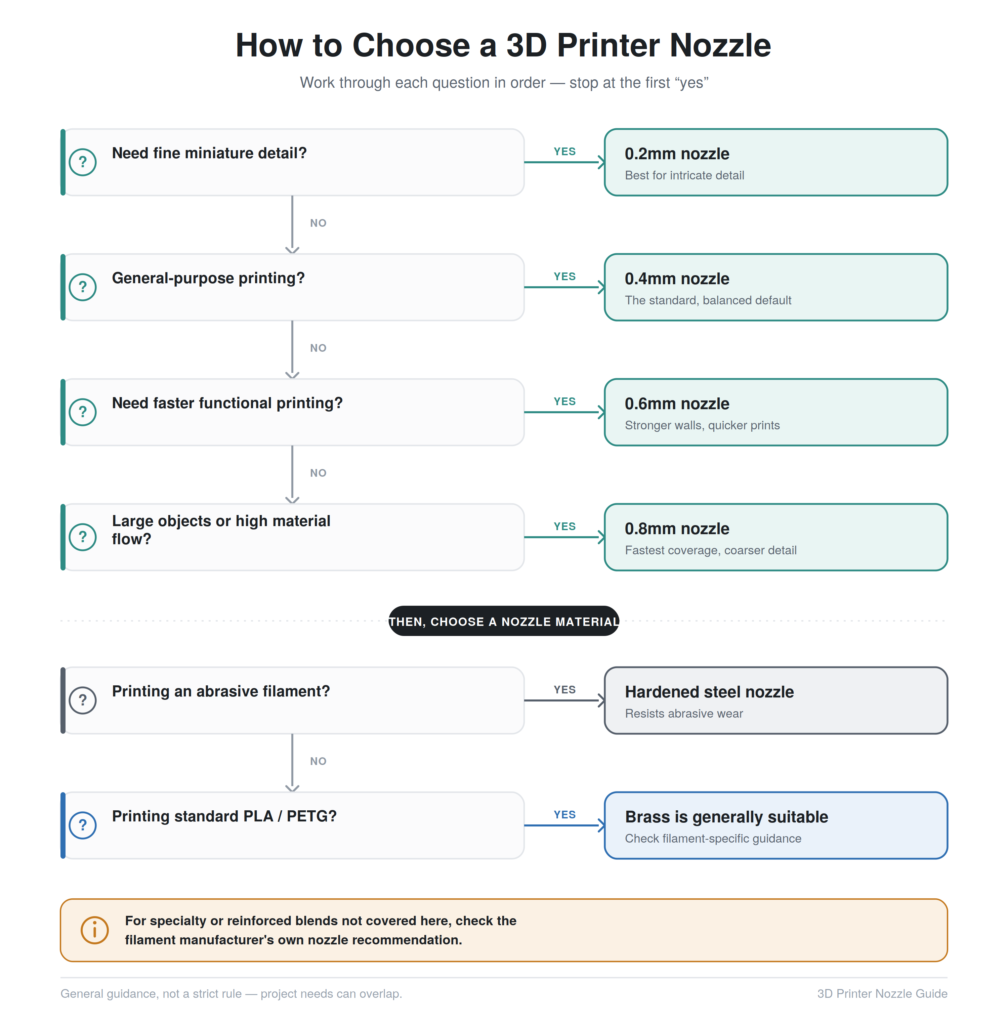
For detailed miniatures, a smaller nozzle — 0.2mm or similar — makes sense given the priority on fine surface detail. For general-purpose printing, a standard 3D printer nozzle 0.4mm remains the sensible default. For faster functional parts where some detail loss is acceptable, a 0.6mm nozzle offers a reasonable middle ground. For large objects where speed and wall strength matter more than fine finish, an 0.8mm nozzle is worth considering. For abrasive filament, a hardened material nozzle is the sensible choice regardless of size. And for beginners generally, sticking with a reliable, standard nozzle rather than immediately experimenting keeps the learning curve manageable.
“3 Nozzle 3D Printer”: What Does It Mean?
This phrase shows up in searches often enough to address directly, and a 3 nozzle 3D printer generally points to a machine with multiple nozzles rather than the single-nozzle setup most beginners are familiar with.
Multi-nozzle setups can mean a few things depending on the specific printer. Dual or multi-extrusion systems allow multi-material or multi-color printing, where different nozzles handle different filaments within the same print — useful for combining colors, or pairing a structural material with a dissolvable support material. Independent dual extruders operate somewhat separately, sometimes allowing different materials or colors without one nozzle oozing onto an active print. Tool-changing systems take a different approach, physically swapping nozzle tools during a print rather than running multiple nozzles simultaneously.
The potential advantages are real — genuine multi-color or multi-material capability a single-nozzle printer can’t offer. The trade-off is increased mechanical complexity and more involved calibration, since keeping multiple nozzles properly aligned is a bigger task than managing one. Not every “3 nozzle” machine works identically, so it’s worth understanding the specific system a given printer uses.
3D Printer Nozzle Compatibility
Not every 3D printer nozzle fits every printer, and this is a genuinely common mistake for people buying replacement or upgrade nozzles without checking first.
Thread type varies between manufacturers and hotend designs, and a nozzle with the wrong thread simply won’t install correctly, or can damage the hotend if forced. Nozzle length and overall dimensions matter too, since hotends are designed around a specific nozzle geometry, and a mismatched length can affect how well the nozzle seats against the heat break. Heatbreak and hotend configuration differ across printer brands, which is part of why a nozzle that works perfectly on one machine may not fit another, even at the same diameter.
The safest approach is always checking the specific printer manufacturer’s specifications before buying, rather than assuming compatibility based on diameter alone.
How to Tell When a 3D Printer Nozzle Needs Replacing
A handful of signs point toward nozzle wear rather than some other cause. Inconsistent extrusion, general under-extrusion that persists even after checking temperature and flow settings, and poor surface quality that’s developed gradually all often point to wear. Extrusion that seems wider than expected can indicate the opening has worn larger than its rated diameter. Visible damage to the tip, recurring clogs despite normal maintenance, and a general decline in print quality compared to what the same settings used to produce are all reasonable signs to inspect the nozzle directly.
It’s worth being honest, though, that not every print problem traces back to the nozzle. Filament moisture, incorrect temperature, extruder tension issues, partial clogs that clear on their own, incorrect slicer settings, and poor bed leveling can all produce similar-looking symptoms. Ruling out these other causes before assuming the nozzle needs replacing saves an unnecessary purchase.
How to Clean a 3D Printer Nozzle
Basic cleaning starts with heating the hotend to the appropriate temperature for whatever filament was last used, since attempting to clean a cold nozzle risks damaging it. From there, gentle cleaning with a nozzle cleaning needle — sized appropriately for the nozzle’s diameter — can clear minor debris without forcing anything.
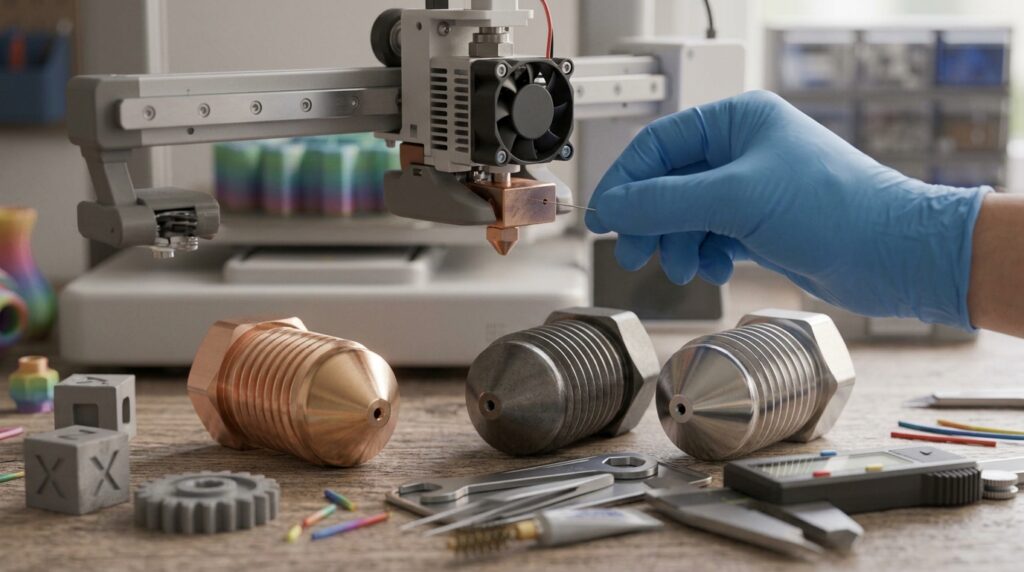
A cold pull, where filament is heated, then allowed to cool slightly before being pulled back through the nozzle, is a commonly used method for clearing certain clogs, though the exact technique and temperature vary by material and printer. For more stubborn clogs, removing the nozzle entirely for cleaning or replacement may be necessary, done carefully to avoid damaging the heat break or hotend threads. When in doubt, checking your printer manufacturer’s specific instructions is safer than guessing, since hotend designs vary enough that a technique appropriate for one machine could cause damage on another.
Lubricant for 3D Printer Nozzle
This phrase comes up in searches often, and it’s worth clarifying directly: lubricant for a 3D printer nozzle is generally not something you apply inside the nozzle itself as routine maintenance. That’s a common point of confusion.
Nozzle cleaning — clearing debris or residue from the opening — is a separate task from hotend maintenance more broadly, which might occasionally involve checking thread condition or ensuring proper seating. Neither of these involves lubricating the nozzle’s actual flow path. Where lubrication does come into play is with a printer’s moving mechanical components — rails, lead screws, certain bearings — not the nozzle or hotend interior, and even then, requirements depend entirely on your specific printer’s design and the manufacturer’s own guidance.
Putting a random lubricant into a hotend isn’t a recommended practice and can cause more problems than it solves, since most lubricants aren’t designed to handle the temperatures involved or interact safely with molten filament.
Common 3D Printer Nozzle Problems
Clogging, whether full or partial, is probably the most familiar issue, often caused by debris, degraded filament, or moisture-related steam disrupting flow. Under-extrusion frequently traces back to a partial clog, incorrect temperature, or an extruder not gripping filament properly. Stringing, while often a retraction and temperature issue, can also worsen with a nozzle that’s developed minor wear affecting how cleanly it stops flow between moves.
Inconsistent extrusion sometimes points to a nozzle with uneven wear, while nozzle leakage — filament oozing from around the nozzle rather than through it — can indicate loose installation or a damaged seal against the heat break. A damaged nozzle tip, from a bed collision or mishandling, changes flow characteristics and usually calls for replacement. Stripped threads, often from over-tightening or repeated removal and installation, compromise the nozzle’s seal and are a common reason a well-maintained printer suddenly develops leakage.
Heat creep — where filament softens too early inside the cooling zone above the nozzle — can cause jamming that looks like a clog but stems from a cooling issue rather than the nozzle itself. And abrasive wear, from carbon fiber or similar filled filaments run through a standard brass nozzle, gradually widens the opening and degrades print consistency over time.
3D Printer Nozzle Maintenance
Good maintenance habits extend nozzle life and catch problems early rather than after they’ve caused a failed print. Regular inspection — a quick visual check for wear or damage — takes little time and catches issues before they become bigger. Keeping filament reasonably clean and free of dust or debris reduces one common source of clogs.
Avoiding unnecessary nozzle damage means being careful during bed leveling, avoiding unnecessary nozzle-to-bed contact, and handling the hotend carefully during any maintenance. Cleaning when genuinely necessary, rather than constantly, avoids introducing wear through excessive handling. Correct installation matters too — proper tightening according to manufacturer instructions, and avoiding cross-threading, which can permanently damage both the nozzle and the hotend it threads into.
Monitoring print quality over time is really the most practical ongoing maintenance habit, since gradual changes in surface finish or extrusion consistency are often the earliest sign that something needs attention. There’s no single fixed replacement schedule that applies to every printer and every material — usage patterns and filament choices affect nozzle lifespan too much for one universal number to be meaningful.
3D Printer Nozzle and Print Settings
Nozzle choice affects more slicer settings than people initially realize. Layer height should generally stay within a sensible range relative to nozzle diameter, and line width typically scales close to the nozzle’s actual diameter, though slicers allow some adjustment. Wall count and top/bottom layer settings interact with nozzle size too, since a larger nozzle reaches a given wall thickness with fewer passes than a smaller one does.
Infill settings are less directly tied to nozzle size but still worth reviewing when switching, since extrusion width changes how infill lines interact with walls. Print speed settings often need adjustment alongside a nozzle change, since a different diameter changes how much material needs to flow per unit of movement.
Temperature and retraction settings may also need minor tuning, since flow characteristics shift somewhat with nozzle size and condition. The practical takeaway: switching nozzle sizes isn’t just a hardware swap — the slicer profile should be adjusted to match, rather than assuming old settings will translate cleanly to a new diameter.
Common Mistakes When Buying a 3D Printer Nozzle
Buying based only on price, without considering machining quality or compatibility, often leads to inconsistent results from cheaply made nozzles with imprecise openings. Ignoring compatibility — assuming any nozzle fits any printer — is a common and avoidable mistake. Assuming bigger is always better misunderstands what nozzle size actually trades off against.
Using brass with abrasive filament wears the nozzle out faster than expected, which is a frustrating and preventable mistake once you know better. Buying extremely small nozzles without understanding their clogging sensitivity and slower print times sets unrealistic expectations. Ignoring nozzle length, particularly when a printer’s hotend is sensitive to exact dimensions, can lead to a nozzle that doesn’t seat correctly.
Buying generic nozzles with inconsistent machining quality sometimes produces genuinely inconsistent extrusion, even at the “right” diameter. Forgetting to keep spare nozzles on hand means a worn or damaged nozzle can halt a project unexpectedly. And changing nozzle size without adjusting corresponding slicer settings is one of the more common ways people get confused about why a print suddenly looks different after a simple hardware swap.
3D Printer Nozzles Buying Guide
Before purchasing, it’s worth running through a practical checklist. Confirm the size actually matches your intended use — detail-focused work calls for something smaller, speed or strength-focused work calls for something larger. Choose material based on what you’re actually printing, favoring hardened steel for abrasive filaments and brass for everything else. Double-check compatibility with your specific printer and hotend rather than assuming based on diameter alone.
Machining quality matters more than it might seem — a well-made nozzle with a precise, clean opening produces more consistent extrusion than a cheaply made one, even at the same nominal size. Think through the intended filament, expected print detail, and expected speed together, since these factors should guide the choice rather than being considered separately.
Set a reasonable budget, understanding that a 3D printer nozzle is a relatively inexpensive part where reasonable quality is worth prioritizing over the absolute cheapest option. And keeping spare nozzles available, particularly in your most commonly used size, avoids unnecessary downtime when one eventually wears out or gets damaged.
Useful Accessories Worth Considering
Beyond the nozzle itself, a few related 3D printer nozzles and accessories round out a sensible setup. A selection of 0.4mm brass nozzles covers routine replacement needs for general-purpose printing. A 0.6mm brass nozzle is worth having if you regularly print functional parts where speed matters. Hardened steel nozzles are worth stocking if you print abrasive filaments like carbon fiber or glow-in-the-dark material regularly. A nozzle cleaning kit, including cleaning needles in appropriate sizes, helps with routine maintenance.
A basic nozzle replacement kit, including any specific tools your printer’s hotend design requires, makes swaps easier. Digital calipers help verify actual nozzle diameter and general dimensional accuracy on prints. And a filament dryer helps address moisture-related issues that can otherwise get mistaken for nozzle problems.
| Product Category | Best For | Recommended Size | Material | Why Consider It | Link |
|---|---|---|---|---|---|
| Brass Nozzle | Everyday printing | 0.4mm | Brass | Affordable, good thermal conductivity, ideal for PLA/PETG | Check Price |
| Brass Nozzle Set | Multiple nozzle sizes | 0.2 / 0.4 / 0.6 / 0.8mm | Brass | Useful if you want to experiment with different print speeds and detail levels | Check Price |
| Hardened Steel Nozzle | Abrasive filament | 0.4 / 0.6mm | Hardened Steel | Better wear resistance for carbon-fiber and glass-filled filaments | Check Price |
| Stainless Steel Nozzle | Specialized printing | 0.4mm | Stainless Steel | Useful for applications where stainless construction is preferred | Check Price |
| Nozzle Cleaning Kit | Maintenance | — | — | Helps clear minor clogs and nozzle debris | Check Price |
| Digital Calipers | Measuring prints/nozzles | — | — | Useful for checking dimensions and tolerances | Check Price |
Affiliate Disclosure: Some of the product categories mentioned below may contain affiliate links. If you purchase through one of these links, we may earn a small commission at no additional cost to you. This helps support the website and does not affect our recommendations.
Frequently Asked Questions
What is a 3D printer nozzle?
It’s the small metal component at the tip of the hotend that shapes and controls the flow of melted filament as it’s deposited onto a print.
What size nozzle is best for a 3D printer?
For most general-purpose printing, a 3D printer nozzle 0.4mm in diameter offers the best balance of detail and speed, though smaller or larger sizes make sense for specific projects.
Is a 3D printer nozzle 0.4mm good for beginners?
Yes — it’s the default size most slicers, tutorials, and community resources are built around, which makes troubleshooting and learning considerably easier.
Is a 0.4mm or 0.6mm nozzle better?
Neither is universally better; 0.4mm favors detail and general-purpose use, while 0.6mm favors speed and wall strength for functional parts.
How often should you replace a nozzle?
There’s no fixed schedule — replacement depends on usage, filament type, and visible signs of wear like inconsistent extrusion or declining print quality rather than a set timeframe.
What nozzle is best for PLA?
A standard brass nozzle handles PLA reliably without any special requirements.
What nozzle is best for carbon fiber filament?
A hardened steel nozzle is generally recommended, since carbon fiber’s abrasive particles wear down brass considerably faster.
How do you unclog a 3D printer nozzle?
Common approaches include heating the nozzle and using a cleaning needle, or performing a cold pull, though the right method depends on the type of clog and your specific printer.
Can you use any nozzle on any 3D printer?
No — thread type, nozzle length, and hotend design vary by manufacturer, so compatibility should always be confirmed before buying a replacement.
Are hardened steel nozzles worth it?
For abrasive filaments like carbon fiber or glass-filled materials, yes; for standard PLA or PETG printing, a brass nozzle is generally sufficient and more cost-effective.
Do you need lubricant for a 3D printer nozzle?
No — lubricant isn’t applied inside the nozzle or hotend as routine care. Lubrication belongs on a printer’s moving mechanical parts, like rails and lead screws, following the manufacturer’s own guidance.
You Might Also Like
- 3D Printing Innovations: What’s Actually Changing and Why It Matters
- How to Calibrate a 3D Printer: A Practical, No-Nonsense Guide
- 3D Printing Problems: Proven Fixes That Actually Work
- Things to 3D Print: A Practical Guide to Useful, Fun, and Worthwhile Projects
- Creality Ender 3 V3: A Practical Look at Features, Specs, and Whether It’s Right for You
- 31 Best 3D Printed Fidget Toys & Fun Toys to Make
- 111 Best 3D Printed Animals to Make: Easy, Articulated & Fun Ideas
- 3D Printer Filament Types Guide
Conclusion
A 3D printer nozzle is easy to overlook, but it shapes nearly every aspect of a print — detail, speed, material compatibility, and reliability all trace back to this one small component. The standard 3D printer nozzle 0.4mm remains a sensible default for most general-purpose printing, thanks to its balance of detail and speed and its broad compatibility with slicer profiles and common materials. Smaller nozzles earn their place for detailed miniature work, and larger ones make sense when speed and wall strength matter more than fine surface finish.
Material matters alongside size — brass covers most standard filaments well, while hardened steel becomes genuinely necessary for abrasive materials like carbon fiber. Compatibility, careful maintenance, and knowing when a 3D printer nozzle actually needs replacing (rather than assuming every print problem is nozzle-related) round out what it takes to get consistent results. None of this requires expert-level knowledge — just a bit of attention to a part that’s easy to ignore until something goes wrong, and genuinely worth understanding before that happens.