

 By
By I remember the exact moment I realized I had no idea what I was doing with drone batteries.
I was standing in a field behind my cousin’s house, watching my DJI Mini 3 Pro slowly float back to me mid-flight because the battery hit 20% and triggered auto-return. I hadn’t even been flying for nine minutes. Nine. I just stood there thinking — okay, I clearly missed something important. My cousin was trying not to laugh. He wasn’t fully succeeding.
That was eight months ago. Drone battery life has been one of the steepest learning curves in this hobby for me — way steeper than actually learning to fly. Which I didn’t expect. I assumed flying would be the hard part. It wasn’t.
This isn’t a buyer’s guide or a ranking of the top 10 best drone batteries. I’m just someone who went through a lot of trial and error, bought things I didn’t need, didn’t buy things I should have, and eventually figured out what actually matters. Maybe something here saves you some money or a slightly puffed battery.
Why I Underestimated This Completely
Why I Underestimated Drone Battery Life Completely
When I first got my drone, I was focused on learning the controls, the app, and the camera settings. Drone battery life felt like an afterthought. You charge it, it runs out, you charge it again. Right?
Wrong. Very wrong.
I had no real understanding of how lithium polymer batteries work, and that ignorance cost me money pretty quickly.
My first mistake: I stored a drone battery at full charge for about three weeks while I was away on a trip. I came back excited to fly, grabbed the battery, and noticed it had already started to puff slightly on one side. Not dramatically — but enough that I was nervous.
Turns out, LiPo batteries — which power most drones — shouldn’t sit at 100% charge for extended periods. They prefer to be stored at around 40–60% charge. This is called the storage voltage level. I didn’t know it was a thing until after the damage was done.
The DJI documentation mentions it if you read carefully. But most people aren’t reading the manual carefully on day one. I certainly wasn’t.
What Drone Battery Life Actually Looks Like in Real Use
Drone battery life on the DJI Mini 3 Pro is advertised at roughly 34 minutes of flight time under perfect conditions. In real life — with wind, some aggressive flying, and not wanting to push it below 15% — you’re looking at maybe 20 to 25 minutes of actual usable air time.
That’s not a lot. And I bought only one extra battery at first because I thought that’d be enough.
It was not enough.
Recommended Drone Battery Gear
Disclosure: This article may contain affiliate links. If you buy through these links, I may earn a small commission at no extra cost to you.
| Product | Why It’s Worth It | CTA |
|---|---|---|
| DJI 30W USB-C Two-Way Charging Hub for Mini 3 Pro | Best drone battery life for Mini 3 Pro | Check on Amazon |
| DJI Mini 3 Pro Battery Plus | Extended drone battery life — 47 mins | View on Amazon |
| DJI Two-Way Charging Hub | Charges multiple batteries in sequence | Check Price |
| 65W USB-C Fast Charger | Cuts charging time significantly | Buy on Amazon |
| LiPo Battery Safe Bag | Storage and transport safety | See Deal |
| DJI Mini 4 Pro Battery | For Mini 4 Pro users | Check on Amazon |
| Battery Storage Case | Organized and protected storage | View Deal |
The Temperature Problem — I Didn’t Believe It Until It Happened
After the puffing incident, I went deep into forums and Reddit trying to understand drone battery health. Lot of conflicting information. Some people charge to 100% the night before. Others say never go above 90% except right before a session. Manufacturer says one thing, enthusiasts say another.
What I eventually landed on: consistency and avoiding extremes. Don’t store full. Don’t store empty. Don’t charge and then leave it sitting for days. Fly it, discharge it a bit, store it around 50%. Simple in theory. Easy to forget in practice — especially when you’re excited to fly and tempted to charge to 100% and leave it overnight for an early morning session.
I’ve done that. The drone battery life on those cells is noticeably shorter now compared to ones I’ve always stored properly. The damage is slow and invisible until you’re looking at a cell that’s down to 80% maximum capacity after 60 cycles instead of the 90%+ you’d expect.
The DJI app has a storage mode on newer models that automatically discharges the battery to storage voltage if you haven’t used it in a few days. I didn’t know this feature existed for embarrassingly long. If your drone supports it, turn it on. It runs in the background and saves you from yourself on the weeks you don’t fly.
Temperature has a huge impact on drone battery life, especially in winter until November.
I tried flying in late November — battery started at 98%, and within three minutes of cold air the app was showing 67% and warning me about low temperatures. I almost brought the drone down immediately. I’d read about this but didn’t actually believe it would be that dramatic.
The drone battery life behaved like it had completely different capacity in the cold. It recovered a bit once the cells warmed through use, but I lost a good five minutes being cautious. What I do now: keep batteries inside my jacket until right before flight in cold weather. Sounds obvious. Wasn’t obvious to me at the time.
Third-Party Batteries — My Honest Experience
At this point I started looking at third-party options, which opened up a whole other world of complexity.
The third-party drone battery market is chaotic. Brands like Powerextra and Melasta show up constantly on Amazon. Prices are significantly lower than OEM. A DJI battery for the Mini 3 Pro runs around $60-70. Some third-party options are listed at $25-30. That’s a real difference when you’re building a battery collection.
I bought one. From Powerextra.
The battery worked, technically, but the drone battery life was noticeably shorter. But it discharged faster than my DJI battery, the DJI app showed a “non-genuine battery” warning every single time I powered on, and after about 12 cycles it started losing capacity noticeably. My DJI batteries at 40+ cycles are still performing close to original spec.
The savings aren’t worth it if OEM parts exist for your current model. Pay the extra $35. I’ve learned this lesson twice now and I’m not learning it a third time.
The Charging Setup — Nobody Talks About This Enough
I started with a standard USB-C cable and a generic wall adapter. Charging times were painfully slow — close to two hours per battery. When I switched to a proper 65W charger and then picked up the DJI two-way charging hub, things got significantly faster and more organized.
The hub charges multiple batteries in sequence and is designed to charge the fullest one first. It also stops at 100% without continuing to push current into the cells — which matters more than most people realize for long-term drone battery life.
If you’re flying with multiple batteries regularly, a charging hub is worth it. It’s not glamorous. Nobody posts about their charging hub. But it changed how I manage my sessions completely.
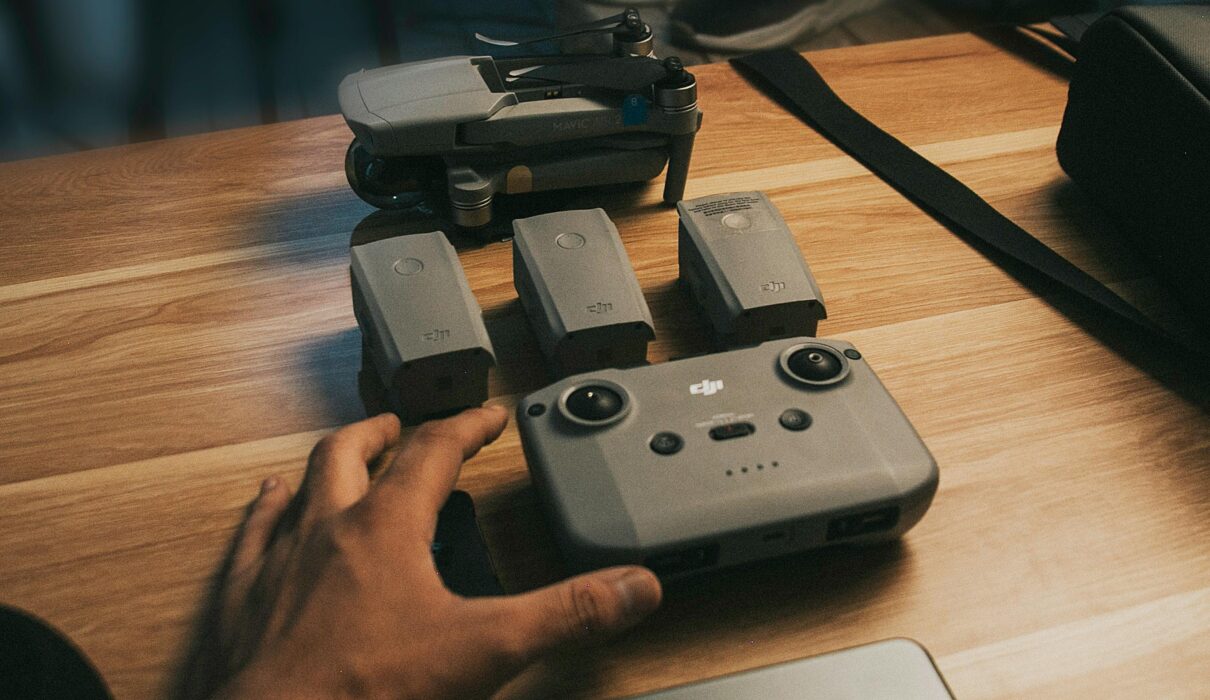
I now fly with three batteries — two OEM and one Powerextra I use only as a backup in good conditions. The hub means I can fly one battery, swap, fly another, come home, plug everything in, and not babysit the charger.
Tracking Flights to Improve Drone Battery Life
After all of this, I started tracking my flights in a simple note on my phone. Nothing formal — just temperature, flight duration, landing percentage, whether the battery felt warm or cool after landing.
This sounds obsessive. It kind of is. But it helped me notice patterns I wouldn’t have caught otherwise. The cold weather drain was the most obvious one. The second was that one of my batteries was consistently running about 8% lower than the other at the same point in a flight — early sign that it was degrading faster, probably because of the incorrect storage early on.
Knowing that before it became a real problem was worth the two minutes of note-taking per session. If you want a simple system: just note the cycle count and the landing percentage after each flight. If a battery that used to land at 15% after 22 minutes is now landing at 15% after 17 minutes — it’s degrading. That’s a clear signal that’s easy to miss if you’re not paying attention.
One more thing I didn’t expect to matter as much as it does: the order you fly your batteries in. If I have two batteries and one is at 95% while the other is at 80%, I always fly the higher one first. Storing a battery at 80% is fine. Storing one at 95% for three days while you fly the other one repeatedly is the kind of thing that quietly degrades capacity over time. Small habits, but they compound over a year of flying.
Questions I Kept Googling
How many charge cycles does a drone battery actually last? For DJI batteries most people get somewhere between 200 and 300 cycles before performance drops noticeably. I’ve seen claims of 400+ but I don’t fully trust those. My first battery is around 45 cycles and still strong. The one I stored incorrectly shows lower peak capacity at similar cycles. Abuse matters more than age.
Is it okay to fly with a partially charged drone battery? Yes, totally. I do it often. If I’ve got 70% and want a short session, I’ll fly down to around 15% and then store or recharge. No rule says you need to start at 100% every time, and starting from partial is pretty normal.
Can cold weather actually damage the battery? Extreme cold below freezing can stress the cells and in severe cases reduce overall lifespan. A typical cool day won’t ruin anything. Warm the battery before flying, and land if you see temperature warnings. Don’t push it past the warnings — that’s not me being cautious, that’s me having ignored a warning once and regretting it.
What do I do if my drone battery starts to puff? Stop using it. I know it’s tempting to squeeze a few more flights out. Don’t. A swollen LiPo is a fire risk. I flew with my slightly puffed battery one more time before retiring it, and I regretted it the entire flight. Dispose of them properly — most electronics stores or battery recycling programs will take them.
How do I improve drone battery life per flight? Fly in calm conditions. Avoid aggressive moves. Keep the drone lower when possible — altitude and wind increase current draw. Land before 15%. These aren’t dramatic changes but they add up to noticeably longer sessions over time.
Eight Months In — Was It Worth It?
There were honestly a few weeks where I thought about selling everything and just using my phone camera. No battery anxiety. No storage voltage paranoia. No watching the percentage drop faster than expected in November cold. No standing in a field watching my drone come home nine minutes into what was supposed to be a proper session.
But then I’ll get a clip where the light is perfect and the angle is impossible to get any other way — a shot I couldn’t have gotten standing on the ground with anything. And I remember why I started.
The drone battery life management stress is just part of the deal. It’s not exciting knowledge. It’s not the reason anyone gets into flying. But it’s the difference between a battery collection that performs well at 200 cycles and one that’s already showing degradation at 50.
Managing it is a skill like any other skill in this hobby — you’re bad at it first, then less bad, then eventually you just do it automatically without thinking about it. The first time I correctly handled cold weather storage it felt deliberate. Now it’s just what I do before I pack up and go home.
What I’d tell someone just starting: buy at least two OEM batteries from day one. Don’t buy three third-party ones thinking you’re saving money — the math doesn’t work out the way you expect when you factor in the shorter lifespan and the constant app warnings. Read about storage voltage before your first trip somewhere, not after you come back to a puffed cell sitting on your workbench.
Also — get a LiPo safe storage bag before you need it. It’s $10-15 and it protects you during charging and storage. Not glamorous. Genuinely important.
I learned all of this backwards. You don’t have to.
You Might Also Like
- Best Budget Drone — What Actually Happened When I Bought One in 2026
- I Built a $300 DIY Drone Kit Six Months Ago — Absolutely No Regrets
- Drone Car Review — My Real Experience After 8 Months (And All the Weird Stuff)
- Drone with Thermal Camera — My Real 6-Month Experience (Mistakes Included)
- How to Become a Drone Pilot — What Actually Happened When I Tried It
- Agricultural Drone — What Actually Happened My First Season – 2026