

 By
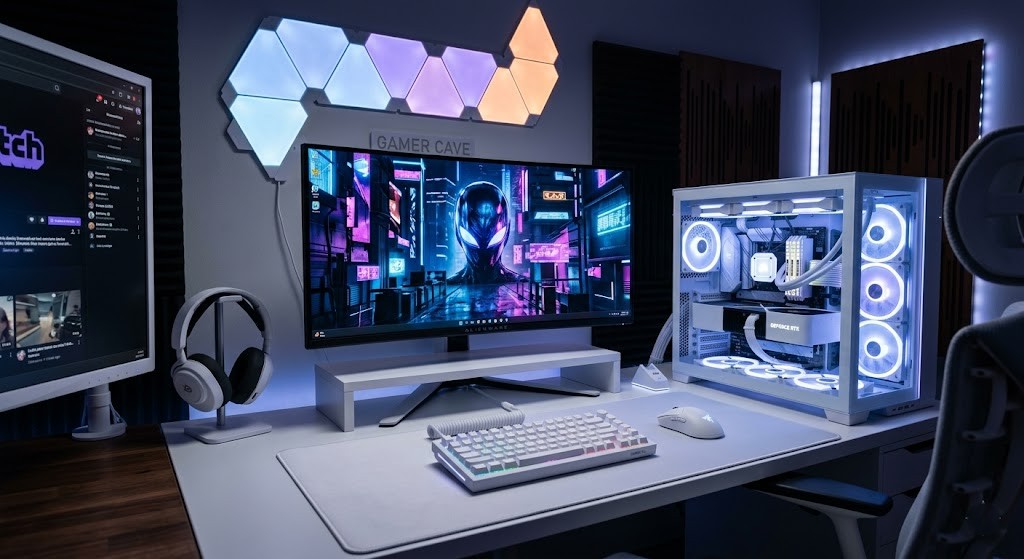
By So I’m sitting at my desk at like 11pm, room is dark, and my white gaming PC is just glowing quietly next to my monitor — and honestly I keep thinking someone’s going to walk in and ask if I turned my setup into a spa. It looks that good. But also that’s kind of the problem, which I’ll get to.
I built my first gaming PC back in 2019. Black mid-tower, Phanteks case, nothing special, very “I watched a Linus Tech Tips video once” energy. It worked fine. Did its job. But I kept seeing these white builds on Reddit and YouTube and slowly, quietly, I became obsessed. Not in a healthy way. Like, I’d save screenshots of other people’s setups at 1am and think — why does my desk look like a server room.
After about eight months of that, I decided to just do it. Full white gaming PC build from scratch. I told myself it was a practical decision. It wasn’t. It was entirely aesthetic. I’m not ashamed of that anymore.
Six months later — here’s everything that actually happened, including the three things I wish someone had warned me about.
The White Color Problem Nobody Talks About
The first thing I learned — the hard way — is that not everything that says “white” actually means white. I’m serious.
I ordered a white Lian Li Lancool 216 case, then started picking out components. GPU — ASUS TUF Gaming RTX 4070 in white. RAM — Corsair Vengeance in white. CPU cooler — Lian Li Galahad 360mm AIO in white. PSU — Corsair RM850x in white.
When everything arrived and I started putting it together, the whites didn’t match. At all.
The case was a clean, slightly warm off-white. The GPU shroud was a cooler, brighter white. The RAM sticks had an almost blue-white tint to the plastic. The PSU was a completely different shade again. I spent a solid twenty minutes convinced I’d ordered wrong parts. Nope — turns out “white” is not a single color in the PC component world and I had absolutely no idea that was going to be an issue.
It bothered me way more than it should have. I literally took the side panel off and stared at it for ten minutes deciding if I needed to return things. Your experience might be different if you’re less particular about this stuff. I am apparently a person who notices things.
What to do instead: Before ordering, search “[component name] white real photos Reddit” — user photos under real lighting will show you the actual shade. Or stick to one brand for as many components as possible. I wish I’d done that.
Cable Management Almost Broke Me
Mistake two — this one cost me a full Saturday.
With a black case you can get away with dark cables not being perfectly routed. With a white gaming PC, everything shows. I had a bundle of PSU cables shoved to the side of the back panel and you could see them through the tempered glass like a shadow just looming there. It drove me insane.
I ended up buying a full set of white cable extensions from CableMod — another $60 I hadn’t budgeted for — and then spent an entire Saturday afternoon re-routing everything. A Saturday. For cables.
When I finally had clean white cables running through white cable channels in a white case, it looked like a product render. So it was worth it. But I want to be clear that nobody tells you going into a white gaming PC build that cable management goes from “annoying” to “this is now a serious project.”
Budget for white PSU cables from the start. Don’t find out the hard way like I did.
Best Components for a White Gaming PC Build
Disclosure: This article may contain affiliate links. If you buy through these links, I may earn a small commission at no extra cost to you.
| Component | Recommended Product | Why I Recommend It | CTA |
|---|---|---|---|
| White PC Case | Lian Li Lancool 207 White | Excellent airflow, premium tempered glass design, clean white finish | Check Price |
| White Graphics Card | ASUS TUF RTX 5070 Ti White Edition | Powerful 1440p/4K gaming performance with strong ray tracing support | View on Amazon |
| White CPU Cooler | Lian Li Galahad II 360 White | Quiet cooling with beautiful RGB aesthetics | Check Availability |
| White Power Supply | Corsair RM850x White | Reliable fully modular PSU with clean white cables | Buy Now |
| White RAM | Corsair Vengeance RGB DDR5 White | Smooth RGB lighting and premium white finish | See Latest Price |
| White Fans | Lian Li UNI FAN SL-INF White | Excellent airflow with clean cable management | Check on Amazon |
| White SSD | Samsung 990 Pro NVMe SSD | Extremely fast game loading and reliable performance | View Deal |
| White Motherboard | ASUS ROG Strix B760-A Gaming WiFi | Perfect white/silver aesthetic with strong gaming features | Check Price |
| White Keyboard | Keychron Q2 White Edition | Premium typing feel with clean aluminum design | Learn More |
| White Gaming Mouse | Logitech G Pro X Superlight White | Lightweight, fast, and excellent for competitive gaming | Check Availability |
| White Monitor | LG 27GP850-B | Smooth 1440p 165Hz gaming experience | Buy on Amazon |
| Cable Extensions | CableMod White Cable Kit | Makes white builds look dramatically cleaner and more premium | View Details |
RGB Looks Completely Different on a White Build
Here’s something I hadn’t thought about going in — RGB on a white gaming PC looks nothing like RGB on a dark build.
On a dark build, RGB looks electric. Bold. Dramatic. On a white build, the same RGB appears softer, more diffused, almost pastel. My first instinct was to set everything to the same cycling profile I used on my old black build. It looked wrong. Too aggressive — like a disco ball at a dentist’s office.
Took some experimenting to find the right profile. I ended up doing a slow, soft white-to-blue shift on everything — the AIO head, the RAM, the fans — with brightness turned down to about 60%. Now it looks like something out of a sci-fi movie. The understated kind, not the loud kind. That took about two weeks of tweaking to land on.
The Coffee Stain Incident
Okay this is the embarrassing one.
While assembling everything, I had the case on its side on my desk. I leaned over to plug in a SATA connector and put my hand down on the case for support — with a coffee ring on my palm from my mug. Left a brown stain on the top of the white gaming PC case. Before I’d even finished building it.
It came off with a damp microfiber cloth but I had a small internal crisis about it for twenty minutes. White cases are beautiful and they are unforgiving. Always have clean, dry hands when working on one. Learn from me, not from experience.
Six Months of Gaming — Actual Performance
The white gaming PC aesthetic has basically nothing to do with performance. Obviously. I want to be upfront about that.
I’m running an i5-13600K, 32GB RAM, RTX 4070, M.2 SSD. It handles everything I play without complaint — Cyberpunk 2077, Elden Ring, Warzone sessions, a lot of hours in Baldur’s Gate 3. Temps are normal: CPU idles around 35C, hits 68-70C under load. GPU runs 72-75C in long sessions. No throttling, no issues.
The white part is entirely separate from any of that. If you’re building a white gaming PC because you think it’ll perform better or run cooler — it won’t. Case color doesn’t affect performance. That’s it.
But here’s what I genuinely didn’t expect: it changed how I feel about sitting down to game. My old setup felt utilitarian. This one feels like somewhere I actually want to be. I clean my desk more. I’m more careful about what’s on it. I bought a proper desk mat. I stopped leaving empty mugs and random cables sitting around because it felt wrong next to the build. The whole vibe of the room shifted in a way I didn’t anticipate and can’t fully explain.
I mentioned this to a friend who games on a pretty standard black setup. He looked at me like I’d said something deeply weird. Maybe I had. But six months later and I still notice it every time I sit down, and that’s not something I expected to still be true at this point.
One thing I’ll add — I’ve had two friends visit who aren’t into PC gaming at all, and both of them commented on the setup unprompted. One asked if it was custom built. The other just said it looked “really clean.” Neither of them had any idea what they were looking at technically, but the white gaming PC aesthetic communicated something to them immediately. That’s kind of the point of aesthetics, I suppose.
The Dust Problem Is Real
Dust. Oh my god, the dust.
A white gaming PC shows every single particle in a way that black cases simply don’t. My Lian Li case has mesh front and top panels — great for temperatures, absolutely brutal for dust visibility. Within three weeks I could see it accumulating on the front mesh and fan blades. My old black case hid that stuff for months.
I have a can of compressed air now that I never owned before. I use it every two weeks. I wipe the exterior with a microfiber cloth about once a week.
This wasn’t a dealbreaker for me but it might be for you. Most white build guides show glamour shots and skip the “clean this constantly” part. I’m telling you upfront: if you hate maintenance or your room gets dusty, factor that in before you commit to a white gaming PC.
What It Actually Cost
Let me put a number on this.
My full white gaming PC build came to about $2,100 all in — including the CableMod cables, white peripherals (Keychron Q2 keyboard, Logitech G Pro X Superlight mouse), everything. A comparable build in standard black colorways probably would’ve been $1,750 to $1,850. So I paid roughly $250 to $350 extra purely for the aesthetic.
White versions of quality components often cost $10 to $20 more per item than the black equivalent. Across a full build that adds up fast. And finding white versions of budget components is genuinely hard — sometimes impossible. A full white gaming PC on a tight budget is difficult in a way that a black build simply isn’t.
Was the premium worth it? For me, yes — I work from home and spend eight to ten hours a day at this desk. The fact that my setup brings me some weird daily satisfaction is worth something real. If you game occasionally and don’t care much about aesthetics, save the money and go black.
Pros and Cons — Honest List
Worth it:
- Looks genuinely incredible when done right
- RGB appears softer and more premium
- Makes the whole desk feel intentional
- Still performing perfectly at six months
Harder than expected:
- Dust visibility is a real commitment
- White shades don’t match across brands
- Cable management is twice the work
- Quality white components cost more
Questions I Keep Getting
Do white cases run hotter? No. Case color has zero effect on temperatures. What matters is airflow and cooler quality. My temps are completely normal.
Is it hard to keep clean? Harder than black, yes. Dust and fingerprints show fast. Build the cleaning habit in from day one — compressed air every two weeks, wipe-down once a week. It’s not a huge deal but it’s a real habit.
Can you build a white gaming PC on a budget? Sort of. The Montech Air 903 Max and Fractal Pop Air White are affordable case options. But finding white budget GPUs and other components is genuinely hard. You might end up with a white case and black GPU, which is fine — just know a truly all-white build usually means spending more.
What’s the one thing you’d do differently? Check the actual white tone of every component before ordering. Search for real user photos, not product renders. Had I done that, the color mismatch situation would’ve been a lot less stressful.
Still Happy With It
Six months in, I’m still really happy with my white gaming PC. The dust thing is real. The color matching was a headache. I spent more than I needed to. I still think it was the right call for me specifically.
There’s something hard to explain about sitting down at a setup that looks exactly like what you imagined for months. I spent a long time looking at other people’s white builds wishing mine looked like that — and now mine does, and that feeling hasn’t fully worn off. Which surprised me. I thought it would after a few weeks. It didn’t.
Would I recommend a white gaming PC to everyone? No. If you’re purely performance-focused, build with whatever’s cheapest and fastest. The color of your case will never show up in your benchmark scores. But if aesthetics matter to you — if you’re the kind of person who cares what their workspace looks and feels like — then the extra cost and maintenance is returning something real every single day.
The dust will accumulate. The cable management will take longer than you want it to. You’ll notice the slight color mismatch between your case and your GPU shroud and it will bother you more than it logically should. All of that is true.
And you’ll still sit down at your desk some evening with the room dark and the RGB doing its slow soft thing and think — yeah, this was worth it.
If the idea of a clean white setup has been living rent-free in your head for months, you already know what you’re going to do.
You Might Also Like
- Gaming PC Under $600: Honest 6-Month Review & Build Guide
- How to Optimize Gaming PC for Ray Tracing Without Killing FPS (2026)
- Best Home Automation Light Switches for Beginners (2026)
- Crestron Home Automation Review: The Shocking Truth After 8 Months (2026)
- Home Automation Switches for Beginners (Honest 2026 Guide)
- Savant Home Automation Review: My Shocking Real Experience After 2 Months