

 By
By So I was sitting on my bedroom floor surrounded by cardboard boxes and zip ties, wondering if I’d made a huge mistake. Parts had just arrived, a YouTube tutorial was paused on my phone, and I was staring at a CPU cooler I was absolutely certain I’d installed backwards. That was back in October.
I’d been gaming on a hand-me-down Dell Inspiron laptop from 2019 for almost two years. It ran Minecraft fine. Everything else? Not so much. Valheim chugged along at maybe 25fps on the lowest settings — which if you’ve played Valheim, you know completely kills the vibe. My friend kept sending me clips of him in Elden Ring and I was out here watching my laptop fans scream like they were auditioning for something.
I started seriously researching a gaming PC under $600 after seeing threads on r/buildapc where people shared their actual experiences. Not the YouTube “best budget gaming PC” videos where the build mysteriously ends up costing $850 after they casually mention “oh and you’ll want an SSD separately.” Real people, real budgets.
I set my ceiling at $580. Every dollar mattered.
Three Weeks of Planning Before I Bought Anything
I spent about three weeks just on PCPartPicker. Embarrassingly so. My lunch breaks at work were basically me comparing Ryzen 5 5600 prices across sites and refreshing to see if anything dropped.
I almost went with an Intel Core i3-12100F build because someone on Reddit said it was the “obvious choice” for budget gaming. I felt like the Ryzen 5 5600 had a little more runway for the future though, and the price difference wasn’t massive at the time I was buying.
Final parts list for my gaming PC under $600:
- CPU: AMD Ryzen 5 5600
- Motherboard: B550M Micro-ATX
- RAM: 16GB DDR4 3200MHz
- GPU: AMD Radeon RX 6600
- Storage: 500GB NVMe SSD (mistake — more on this)
- PSU: Corsair CX550 80+ Bronze
- Case: Budget Micro-ATX case
The RX 6600 was the part I agonized over most. I kept going back and forth between that and a used RTX 3060, but used GPU prices in my area were all over the place and I didn’t fully trust the listings. New RX 6600 it was.
Recommended Parts for a Gaming PC Under $600
Disclosure: This article may contain affiliate links. If you buy through these links, I may earn a small commission at no extra cost to you.
| Component Category | Recommended Product | Why It’s Good for a $600 Gaming PC | CTA |
|---|---|---|---|
| CPU | AMD Ryzen 5 5600 | Excellent value 6-core CPU for 1080p gaming and multitasking | Check on Amazon |
| CPU Alternative | Intel Core i5-12400F | Strong budget Intel option with solid gaming performance | View on Amazon |
| Budget CPU | AMD Ryzen 5 5500 | Lower-cost option for tighter builds | See Latest Price |
| GPU | AMD Radeon RX 6600 8GB | Best value GPU for 1080p high settings gaming | Check Current Deal |
| GPU Upgrade | AMD Radeon RX 7600 | Faster alternative with better FPS performance | Buy on Amazon |
| GPU Alternative | Intel Arc A750 | Good budget GPU with AI-enhanced features | Check Availability |
| RAM | Corsair Vengeance 16GB DDR4 3200MHz | Smooth multitasking and modern gaming support | Check on Amazon |
| RAM Alternative | Crucial 16GB DDR4 Kit | Reliable and affordable DDR4 memory | View Current Price |
| SSD | WD Black SN770 NVMe SSD | Fast game loading and Windows boot times | Check on Amazon |
| SSD Alternative | Crucial P3 Plus 1TB | Budget-friendly NVMe SSD with good speeds | See Today’s Price |
| Motherboard | B550M Micro-ATX Motherboard | Great compatibility for Ryzen budget builds | View on Amazon |
| Power Supply | Corsair CX650 80+ Bronze PSU | Reliable power delivery for budget gaming systems | Check Current Price |
| PC Case | Montech X3 Mesh Case | Excellent airflow with included fans | Buy on Amazon |
| CPU Cooler Upgrade | Cooler Master Hyper 212 | Better thermals and quieter performance | Check Availability |
| Gaming Monitor | Acer Nitro 24” 1080p 144Hz | Smooth high-refresh-rate gameplay | View Current Deal |
| Gaming Keyboard | Redragon Mechanical Keyboard | Affordable mechanical keyboard for gaming | Check on Amazon |
| Gaming Mouse | Logitech G203 Gaming Mouse | Popular budget gaming mouse | See Latest Price |
| Gaming Headset | HyperX Cloud Stinger | Comfortable headset with solid sound quality | Buy on Amazon |
The Build — Five Hours and One Embarrassing Mistake
The build itself took about five hours. Some of that was me sitting very still, staring at the motherboard manual, convinced I was about to break something expensive.
My first mistake during the build: I almost skipped installing the CPU cooler backplate correctly. Caught it before it became a problem.
My second mistake — and this one took twenty minutes to figure out — was forgetting to remove the plastic film on the thermal pad. There was a tiny film of plastic between the cooler and the CPU. The cooler wasn’t sitting flush and I couldn’t understand why. Spent twenty minutes troubleshooting before I finally spotted the film. Peeled it off, reseated everything, problem solved. Embarrassing.
First boot was nerve-wracking. Hit the power button and just stood there. It posted. I let out a breath I didn’t realize I’d been holding.
Storage Mistake — Buy 1TB, Not 500GB
Storage was where I made my biggest planning error. I bought a 500GB SSD thinking it would be plenty. I don’t know what I was thinking. Modern games are enormous. Warzone alone took up around 90GB when I installed it.
Two weeks after finishing my gaming PC under $600, I was already getting low storage warnings and doing the sad shuffle of deleting games I still wanted to play. Had to buy a 1TB HDD a month later.
Lesson: If you’re building a gaming PC under $600, get a 1TB NVMe from the start. The price difference between 500GB and 1TB is maybe $15-20. It’s worth every cent. Don’t repeat my mistake.
Gaming Performance — What Actually Happened
The first game I launched was Cyberpunk 2077. Dramatic choice, I know. I wanted to test the ceiling immediately.
I was genuinely shocked. On medium-high settings at 1080p, I was getting around 55-65fps pretty consistently in most areas. Night City’s busiest intersections dropped it closer to 45-50, which was a little rough. But this was Cyberpunk 2077 on a gaming PC under $600. Compared to my laptop that couldn’t even open the game without immediately overheating and crying, it felt like magic.
Elden Ring ran beautifully. Mostly locked 60fps, very rare dips, looked genuinely gorgeous. I sat there for a moment just appreciating it. That was the one that made me feel like yeah — this was worth it.
Then I tried Fortnite with some friends and this part confused me for a while. Massive frame drops in certain areas that I couldn’t explain. My friends with more expensive setups weren’t seeing anything like it. I thought something was wrong with the build.
Turns out it was a driver issue. The AMD drivers I’d installed were a version behind with known Fortnite issues. Updated the drivers, most of the problem went away. Wasted about two hours of my life on that.
Red Dead Redemption 2 was the surprise. Notoriously demanding game. With FSR enabled on Quality mode, I was hitting 55-65fps on mostly high settings. Looked amazing. Sat there kind of stunned for a minute.
The Settings Learning Curve Nobody Warns You About
One thing I didn’t anticipate with building a gaming PC under $600 was how much time I’d spend messing with settings. On a console you just hit play. On a budget PC, you’re constantly tweaking. Turn on FSR here, drop shadows there, figure out which settings actually matter versus which ones tank performance without visibly improving anything.
I actually enjoy it now. But those first few weeks I found it exhausting.
The case I bought — a cheap Micro-ATX case — had one front panel USB port that just never worked right. Plug something in and it would connect and disconnect randomly. Mildly annoying. Still is. I’ve just stopped using it and use the rear ports instead. If you’re going extremely budget on the case, some corners get cut in ways you’ll notice.
Six Months Later — Honest Verdict
I’ve been using this gaming PC under $600 for six months now and most of the time I’m really happy with it. The GPU is the main limitation, which I kind of knew going in.
At 1440p it struggles more than I’d like — I tried bumping resolution on a few games and fps drops were significant enough that I went back to 1080p. For 1080p gaming though? It punches above its weight class. I genuinely enjoy gaming on it every day.
Ray tracing is where the RX 6600 shows its limits. It handles ray tracing technically, but enabling it in most games tanks the framerate too much to be worth it. That’s the honest tradeoff of a gaming PC under $600 — you get excellent rasterization performance at 1080p, but you’re not getting ray tracing or high-res gaming. That’s a fair trade at this price point and I went in knowing it, but worth saying clearly for anyone who has different expectations.
Temperatures have been solid but warmer than I’d like. The Ryzen 5 5600 with the stock Wraith Stealth cooler runs around 78-80°C during long sessions under load. Not dangerous but not ideal. If I could redo this, I’d grab a Cooler Master Hyper 212 for around $25. That’s another small mistake — I convinced myself the stock cooler was totally fine. It is fine, but a budget aftermarket cooler would’ve given me more breathing room and let me push the CPU slightly harder.
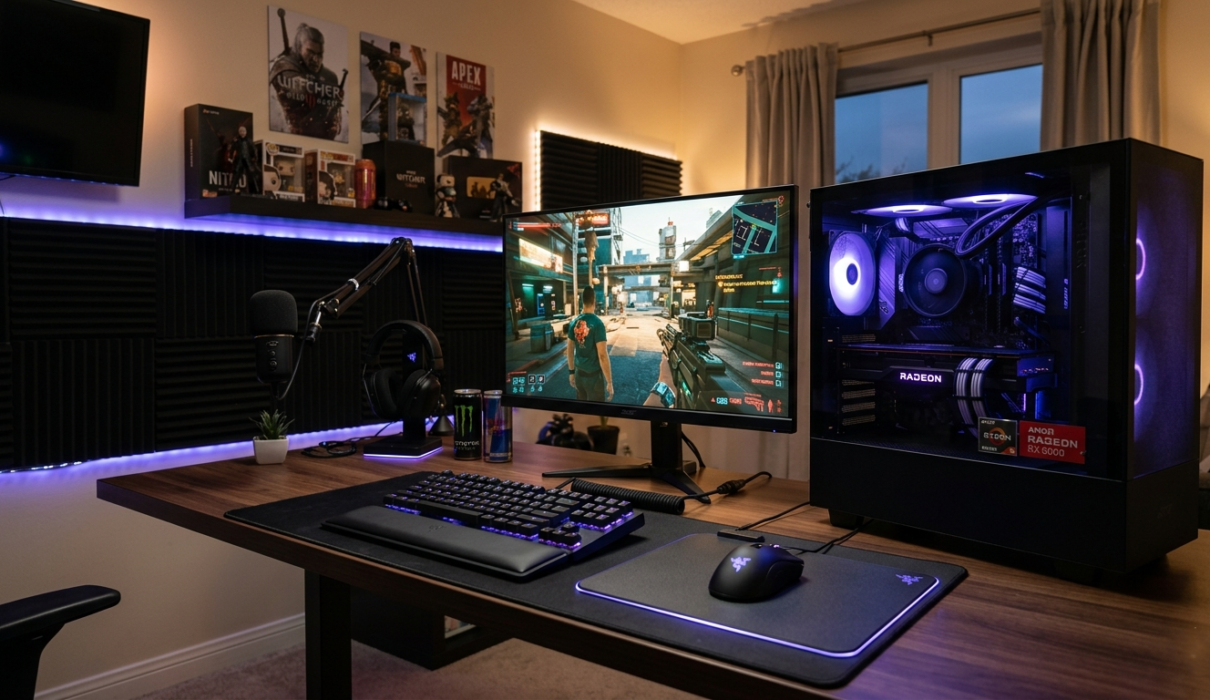
No RGB anywhere in my build. I made a choice early on to put zero budget toward aesthetics and all of it toward performance. I’ve seen people spend $60 on RGB RAM when they could’ve used that to upgrade the GPU slightly or grab a better cooler. Performance over pretty, always, on a tight budget.
I’m somewhere around 400 hours logged across various games in six months. Elden Ring, Cyberpunk, RDR2, Valheim — the games I specifically built this for — all running well. That’s a lot of real-world data on how the machine performs day to day, and it’s held up.
Something I Didn’t Expect
Building the thing myself made me more invested in it. I know every part in there. When something feels off, I have a starting point for troubleshooting. When friends ask about building a gaming PC under $600 — and a couple have, I’ve become the unofficial budget PC guy in my group — I actually know what to tell them from real experience, not just from videos.
There’s one thing I wish someone had told me before I started: a gaming PC under $600 isn’t a compromise machine you tolerate. It’s a real gaming PC that plays real games well. I almost gave up on the whole idea back when I was planning and saw how much GPU prices were during the shortage era. I’m glad I waited. The GPU market in late 2023 and into 2024 made the gaming PC under $600 realistic again in a way it hadn’t been for a while — and if you’re reading this now, the value at this price point is genuinely good.
The rig is genuinely good as-is. Upgrade when something actually bothers you in practice, not because of theoretical performance on paper. I wasted two weeks right after finishing the build planning “the next upgrade” when I should’ve just been playing games. Don’t do that.
Questions My Friends Keep Asking
Can a gaming PC under $600 actually run modern games? At 1080p, yes. You’ll be hitting 60fps on medium-high in most titles without much trouble. Some games run surprisingly well even on higher settings — RDR2 with FSR, Elden Ring, most multiplayer shooters. The games that will give you trouble are the extremely demanding ones like Alan Wake 2 or Cyberpunk with RT enabled. Those require more compromise. But the vast majority of what most people actually play? Fine.
Should I build or buy a prebuilt? Personal call. I built mine, learned a lot, glad I did. But prebuilts at this price range have gotten more competitive — iBUYPOWER and CLX have some decent options. You’re giving up some performance per dollar compared to building yourself, but you’re not spending a Saturday afternoon on your floor with a YouTube tutorial and mild anxiety. Both are valid paths depending on how much you enjoy the process.
Should I wait for better deals before building? GPU prices fluctuate a lot. If you see the RX 6600 or RX 7600 drop noticeably, that’s a good time to pull the trigger. But don’t wait indefinitely — there’s always something newer coming. If the deal is reasonable now, build now and enjoy it now.
When should I plan to upgrade? Don’t immediately stress about upgrading after finishing the build. Upgrade when something actually bothers you in practice, not because of numbers on a spec sheet. The 1080p experience on this rig is genuinely solid for at least another year or two.
Still Running Fine
Six months ago I was on that bedroom floor with zip ties and scattered cardboard thinking I’d messed everything up.
Now that Dell laptop is somewhere in a closet collecting dust.
If you’re on the fence about whether a gaming PC under $600 is even realistic — I get it. I was there. But the math works if you’re patient about parts prices, and the experience of building and using one is way more satisfying than I expected. Even the parts where I nearly lost my mind over a plastic film on a thermal pad.
You Might Also Like
- Best AI Tools for Teachers in 2026 (Actually Useful in Real Classrooms)
- Best AI Avatar Tools for Multilingual Voiceovers (Real Review 2026)
- Affordable AI Recruiting Tools for Small Teams (Honest Review 2026)
- Beginner’s Guide to Mini RC Drift Cars (Real Experience After 3 Years)
- Home Automation Switches for Beginners (Honest 2026 Guide)
- Savant Home Automation Review: My Shocking Real Experience After 2 Months